Compare commits
| Author | SHA1 | Date | |
|---|---|---|---|
 天涯古巷 |
ba0da60a59 | ||
|
天涯古巷
|
d610021058 | ||
|
天涯古巷
|
b4cf8841e6 | ||
|
Yao Fang
|
a253228878 | ||
|
Yao Fang
|
6d34de5f61 | ||
|
Yao Fang
|
adff19e721 | ||
|
天涯古巷
|
4840ad903f | ||
 Jason |
ec0fd5bd97 | ||
|
Jason
|
17883d7ff8 | ||
|
天涯古巷
|
f199912238 | ||
|
Jason
|
0785990fe3 | ||
|
天涯古巷
|
4ecdc35fe8 | ||
|
天涯古巷
|
33afef2a3a | ||
|
天涯古巷
|
98a522dd9b | ||
|
天涯古巷
|
04a9f15862 | ||
|
Jason
|
97cdb59e7a | ||
|
天涯古巷
|
74feb62773 | ||
|
天涯古巷
|
e209042182 | ||
|
Jason
|
e54c30ba54 | ||
|
Jason
|
66e30bb654 | ||
|
Jason
|
b9f5d684d5 | ||
|
Yao Fang
|
994d4cc388 | ||
|
Yao Fang
|
a6893e8a12 | ||
|
天涯古巷
|
16de66f588 | ||
|
Yao Fang
|
b57d4ca5ef | ||
|
天涯古巷
|
fefdbb9019 | ||
 The Fierce Warrior |
6dd65de432 | ||
|
天涯古巷
|
0e9a6e534f | ||
|
天涯古巷
|
cca35a0308 | ||
|
天涯古巷
|
9ae9eaad28 | ||
|
天涯古巷
|
de277b7f04 | ||
|
天涯古巷
|
d9294d2fe5 | ||
|
Jason
|
99c089695c | ||
|
Jason
|
a1514ba340 | ||
|
天涯古巷
|
2c3eb608d2 | ||
|
天涯古巷
|
8f91243058 | ||
|
Yao Fang
|
183881ea81 | ||
|
Jason
|
27628d4089 | ||
|
Jason
|
709ab6b621 | ||
|
Yao Fang
|
aa941ea883 | ||
|
Yao Fang
|
b8f42bc267 | ||
|
Yao Fang
|
970afc7b30 | ||
|
Yao Fang
|
3418abbf73 | ||
|
Yao Fang
|
06ad5838bb | ||
|
Yao Fang
|
7b1c1433d0 | ||
|
Yao Fang
|
bc3ec0f93e | ||
|
Yao Fang
|
698803f50c | ||
|
天涯古巷
|
f709aa4eb3 | ||
|
天涯古巷
|
951fcc6eb0 | ||
|
天涯古巷
|
c4ab54ced0 | ||
|
天涯古巷
|
ae6c1f9482 | ||
|
天涯古巷
|
eb5a3c0e62 | ||
|
天涯古巷
|
13e83aa88b | ||
|
天涯古巷
|
1129d906a8 | ||
|
天涯古巷
|
29c859b7af | ||
|
天涯古巷
|
892c3b204d | ||
|
天涯古巷
|
c1273cee81 | ||
|
天涯古巷
|
71c84320c5 | ||
|
天涯古巷
|
fa7fac45c0 | ||
|
天涯古巷
|
0812857748 | ||
|
天涯古巷
|
42c28f866f | ||
|
天涯古巷
|
85bf0d9819 | ||
|
天涯古巷
|
feabd8df73 | ||
|
天涯古巷
|
6d9a60d89c | ||
|
天涯古巷
|
6d2b5f27f3 | ||
|
天涯古巷
|
a6d63a5955 | ||
|
天涯古巷
|
7f886ccd38 | ||
|
天涯古巷
|
f76c600a9a | ||
|
Yao Fang
|
c4e0a14093 | ||
|
天涯古巷
|
34c5537c6b | ||
|
天涯古巷
|
8009306b50 | ||
|
Yao Fang
|
60858b23a8 | ||
|
Yao Fang
|
c33892df89 | ||
|
天涯古巷
|
36c109ae2c | ||
|
天涯古巷
|
fbd1adec8e | ||
|
Yao Fang
|
814cb61a80 | ||
|
Yao Fang
|
e333371c88 | ||
|
Yao Fang
|
fa6bf6d6f7 | ||
|
Yao Fang
|
bbd3ed1642 | ||
|
Yao Fang
|
d39d459269 | ||
|
Yao Fang
|
df30efc82e | ||
|
天涯古巷
|
c222d34135 | ||
 latot |
a45b6f384a | ||
|
天涯古巷
|
4bc7671e3e | ||
|
天涯古巷
|
839efc0c72 | ||
|
Yao Fang
|
17c6ea05d4 | ||
|
Yao Fang
|
5545638e34 | ||
|
Yao Fang
|
b5c4d51aa8 | ||
|
天涯古巷
|
d3771430ef | ||
|
天涯古巷
|
904e9ced7e | ||
|
天涯古巷
|
e585502179 | ||
|
天涯古巷
|
539c04cb07 | ||
|
天涯古巷
|
5456ba8da4 | ||
|
天涯古巷
|
f8ac7b80c1 | ||
|
Jason
|
3ef89a85fa | ||
|
天涯古巷
|
5174544b46 | ||
|
天涯古巷
|
3c97e80c3b | ||
|
天涯古巷
|
83a9c7ba07 | ||
|
天涯古巷
|
8120b262b8 | ||
|
天涯古巷
|
d1b3e06d44 | ||
|
天涯古巷
|
30485ecb59 | ||
|
天涯古巷
|
22bb4bbb32 | ||
|
天涯古巷
|
e7da04cddb | ||
|
天涯古巷
|
9fca0d488b | ||
|
天涯古巷
|
b26f7617bc | ||
|
天涯古巷
|
2a8855c090 | ||
|
天涯古巷
|
35fb887230 | ||
|
天涯古巷
|
c4ada7277b | ||
|
天涯古巷
|
8090e7200c | ||
|
天涯古巷
|
f82aa18e29 | ||
|
Yao Fang
|
54756bfdc7 | ||
|
Yao Fang
|
0f8b78a993 | ||
|
Yao Fang
|
3fcd9d3e1f | ||
|
天涯古巷
|
2229c99a96 | ||
|
Jason
|
4010893b42 | ||
|
天涯古巷
|
a3b07e1342 | ||
|
Yao Fang
|
106a8d8249 | ||
|
天涯古巷
|
f0285fe307 | ||
|
天涯古巷
|
ee56c21d03 | ||
|
天涯古巷
|
5aaca56b84 | ||
|
Jason
|
0fedb22ca4 | ||
|
Jason
|
fd1c428073 | ||
|
Jason
|
2262c992f1 | ||
|
Jason
|
e71256e1bb | ||
|
Jason
|
d33e6293ec | ||
|
Yao Fang
|
099241a901 | ||
|
Yao Fang
|
99b8fd9955 | ||
|
Yao Fang
|
2794f0a0bb | ||
|
天涯古巷
|
18a24a8a4f | ||
|
天涯古巷
|
6553949129 | ||
|
天涯古巷
|
9e72bea5a1 | ||
|
天涯古巷
|
105894fe39 | ||
|
Yao Fang
|
429b593847 | ||
|
Yao Fang
|
833f605170 | ||
|
Yao Fang
|
4052340195 | ||
|
Yao Fang
|
8d56193509 | ||
|
Yao Fang
|
e326522995 | ||
|
Jason
|
6afee0d779 | ||
|
Jason
|
b252c4713d | ||
|
Jason
|
c5e4c9fca3 | ||
|
Jason
|
cb99861430 | ||
|
Jason
|
7d9ba0ac0e | ||
|
Jason
|
4d84648da1 | ||
|
Jason
|
562d45a499 | ||
|
Jason
|
88b1bda34b | ||
|
Jason
|
644c431e01 | ||
|
天涯古巷
|
f946be1314 | ||
|
天涯古巷
|
06b4935a7c | ||
|
天涯古巷
|
bc81b3ca89 | ||
|
Yao Fang
|
2f58798ecf | ||
|
天涯古巷
|
c1467590f2 | ||
|
天涯古巷
|
a740c63102 | ||
|
天涯古巷
|
257ee3311e | ||
|
天涯古巷
|
781dab0147 | ||
|
天涯古巷
|
272ba0ba2a | ||
|
天涯古巷
|
98ffd6cdad | ||
|
天涯古巷
|
dc7f0986ab | ||
|
天涯古巷
|
85cf61d51a | ||
|
Yao Fang
|
56cc7ce5df | ||
|
天涯古巷
|
033ffcbb99 | ||
|
天涯古巷
|
2a0f723187 | ||
|
天涯古巷
|
50672802c4 | ||
|
天涯古巷
|
8008b35e37 | ||
|
天涯古巷
|
8b9f4656fb | ||
|
Yao Fang
|
2b6e058817 | ||
|
Yao Fang
|
8a3478d45d | ||
|
Yao Fang
|
ca4789fa49 | ||
|
Yao Fang
|
13720e3cc8 | ||
|
Yao Fang
|
ad2dda9a11 | ||
|
天涯古巷
|
8dd5507426 | ||
|
天涯古巷
|
71d27e55fa | ||
|
天涯古巷
|
33aef764e0 | ||
|
Yao Fang
|
d59d0788bb | ||
|
Yao Fang
|
437a87fd3d | ||
|
Yao Fang
|
b0a95d389d | ||
|
Yao Fang
|
dc17b70d3a | ||
|
Yao Fang
|
53d2b49757 | ||
|
Yao Fang
|
09cc1e670c | ||
|
Yao Fang
|
5cbe01ae3a | ||
|
Yao Fang
|
bc311053ea | ||
|
Yao Fang
|
8453525251 | ||
|
Yao Fang
|
22c6152e03 | ||
|
Yao Fang
|
c95a538994 | ||
|
Yao Fang
|
aa02559e19 | ||
|
Yao Fang
|
bd107334ef | ||
|
Yao Fang
|
c6fc4b1667 | ||
|
Yao Fang
|
23858257c1 | ||
|
Yao Fang
|
6b4c200997 | ||
|
Yao Fang
|
64ad42d94f | ||
|
Yao Fang
|
c15d73e36a | ||
|
Yao Fang
|
d29e21bbf0 | ||
|
Yao Fang
|
98ef8d1ec7 | ||
|
Yao Fang
|
3f1f065e71 | ||
|
Yao
|
e51604bfde | ||
|
Yao
|
efedc7e361 | ||
|
Yao
|
a0d3d76545 | ||
|
Yao Fang
|
8ed6ee4231 | ||
|
Yao Fang
|
0d011ebb5b | ||
|
Yao Fang
|
5d58fe5503 | ||
|
Yao Fang
|
82c2bddf6d | ||
|
Yao Fang
|
ff4bd13342 | ||
|
Yao Fang
|
72612ff0cf | ||
|
Yao Fang
|
af9acb32cd | ||
|
Yao Fang
|
f1a71ce528 | ||
|
Yao Fang
|
39fc2926c0 | ||
|
Yao Fang
|
0d04cd736e | ||
|
Yao Fang
|
bf9559a2cc | ||
|
Yao Fang
|
beb4921602 | ||
|
Yao Fang
|
a81eb3bbef | ||
|
Yao Fang
|
5f170cc27a | ||
|
Yao Fang
|
a25b0e490d | ||
|
Yao Fang
|
757efd55be |
No files matched your search
@@ -0,0 +1,14 @@
|
||||
channels:
|
||||
- defaults
|
||||
show_channel_urls: true
|
||||
default_channels:
|
||||
- http://mirrors.aliyun.com/anaconda/pkgs/main
|
||||
- http://mirrors.aliyun.com/anaconda/pkgs/r
|
||||
- http://mirrors.aliyun.com/anaconda/pkgs/msys2
|
||||
custom_channels:
|
||||
conda-forge: http://mirrors.aliyun.com/anaconda/cloud
|
||||
msys2: http://mirrors.aliyun.com/anaconda/cloud
|
||||
bioconda: http://mirrors.aliyun.com/anaconda/cloud
|
||||
menpo: http://mirrors.aliyun.com/anaconda/cloud
|
||||
pytorch: http://mirrors.aliyun.com/anaconda/cloud
|
||||
simpleitk: http://mirrors.aliyun.com/anaconda/cloud
|
||||
@@ -0,0 +1,12 @@
|
||||
# These are supported funding model platforms
|
||||
|
||||
github: YaoFANGUK
|
||||
patreon: # Replace with a single Patreon username
|
||||
open_collective: # Replace with a single Open Collective username
|
||||
ko_fi: # Replace with a single Ko-fi username
|
||||
tidelift: # Replace with a single Tidelift platform-name/package-name e.g., npm/babel
|
||||
community_bridge: # Replace with a single Community Bridge project-name e.g., cloud-foundry
|
||||
liberapay: # Replace with a single Liberapay username
|
||||
issuehunt: # Replace with a single IssueHunt username
|
||||
otechie: # Replace with a single Otechie username
|
||||
custom: # Replace with up to 4 custom sponsorship URLs e.g., ['link1', 'link2']
|
||||
@@ -351,4 +351,8 @@ $RECYCLE.BIN/
|
||||
# End of https://www.toptal.com/developers/gitignore/api/intellij+all,python,pycharm+all,macos,windows
|
||||
/backend/models/ch_rec/inference.pdiparams
|
||||
/output/
|
||||
/backend/test.py
|
||||
/dylib/
|
||||
/settings.ini
|
||||
/test.py
|
||||
/test2.py
|
||||
@@ -1,18 +1,58 @@
|
||||
简体中文 | [English](README_en.md)
|
||||
|
||||
## 项目简介
|
||||
|
||||

|
||||

|
||||

|
||||

|
||||
|
||||
video-subtitle-extractor是一款将视频中的硬字幕提取为外挂字幕文件(srt格式)的软件。
|
||||
主要实现了以下功能:
|
||||
|
||||
- 提取视频中的关键帧
|
||||
- 检测视频帧中文本的所在位置
|
||||
- 识别视频帧中文本的内容
|
||||
- 过滤非字幕区域的文本
|
||||
- 去除重复字幕行,去除水印(台标)文本
|
||||
- 生成srt字幕文件
|
||||
- 多语言:支持**中文/英文**、**繁体中文**、**日语**、**韩语**、**法语**、**德语**、**俄语**、**西班牙语**、**葡萄牙语**、**意大利语**字幕的提取
|
||||
- 多模式:
|
||||
- **快速** - 快速提取字幕但可能丢字幕(默认请使用这个,实在丢字幕严重再换精准,快速的效果已经很好了,关键比精准快了太多了)
|
||||
- **精准** - 不丢字幕但速度较慢
|
||||
|
||||
QQ交流群:210150985
|
||||
|
||||
**使用说明**:
|
||||
|
||||
- 视频以及程序路径请**不要带中文和空格**,否则可能出现未知错误!!!
|
||||
|
||||
> 如:以下存放视频和代码的路径都不行
|
||||
>
|
||||
> D:\下载\vse\运行程序.exe(路径含中文)
|
||||
>
|
||||
> E:\study\kaoyan\sanshang youya.mp4 (路径含空格)
|
||||
|
||||
- 直接下载压缩包解压运行,如果不能运行再按照下面的教程,尝试源码安装conda环境运行
|
||||
|
||||
**下载地址**:
|
||||
|
||||
- Windows 单文件版本(双击直接运行,每次打开时会有一点慢,**推荐小白使用**)
|
||||
- 国内:<a href=https://github.91chi.fun//https://github.com//YaoFANGUK/video-subtitle-extractor/releases/download/0.3.0/vse.exe>vse.exe</a>
|
||||
- 国外:<a href="https://github.com/YaoFANGUK/video-subtitle-extractor/releases/download/0.3.0/vse.exe">vse.exe</a>
|
||||
|
||||
- Windows GPU版本:
|
||||
- 国内:<a href="https://github.91chi.fun/https://github.com//YaoFANGUK/video-subtitle-extractor/releases/download/0.3.0/vse_windows_GPU.7z">vse_windows_GPU.7z</a>
|
||||
- 国外:<a href="https://github.com/YaoFANGUK/video-subtitle-extractor/releases/download/0.3.0/vse_windows_GPU.7z">vse_windows_GPU.7z</a>
|
||||
|
||||
- Windows CPU版本:
|
||||
- 国内:<a href=https://github.91chi.fun//https://github.com//YaoFANGUK/video-subtitle-extractor/releases/download/0.3.0/vse_windows_CPU.zip>vse_windows_CPU.zip</a>
|
||||
- 国外:<a href="https://github.com/YaoFANGUK/video-subtitle-extractor/releases/download/0.3.0/vse_windows_CPU.zip">vse_windows_CPU.zip</a>
|
||||
|
||||
- MacOS CPU版本:
|
||||
- 国内:<a href="https://github.91chi.fun/https://github.com//YaoFANGUK/video-subtitle-extractor/releases/download/0.1.0/vse_macOS_CPU.dmg">vse_macOS_CPU.dmg</a>
|
||||
- 国外:<a href="https://github.com/YaoFANGUK/video-subtitle-extractor/releases/download/0.1.0/vse_macOS_CPU.dmg">vse_macOS_CPU.dmg</a>
|
||||
|
||||
|
||||
|
||||
## 项目特色
|
||||
|
||||
@@ -21,24 +61,24 @@ video-subtitle-extractor是一款将视频中的硬字幕提取为外挂字幕
|
||||
- (CLI版本) 无需用户手动设置字幕区域,项目通过文本检测模型自动检测字幕区域
|
||||
- (GUI版本) 图形化界面
|
||||
|
||||
<img src="https://z3.ax1x.com/2021/04/09/cNrA1A.png">
|
||||
<img src="https://z3.ax1x.com/2021/04/09/cNrA1A.png" alt="demo">
|
||||
|
||||
点击【打开】后选择视频文件,调整字幕区域,点击【运行】
|
||||
|
||||
|
||||
> **有任何改进意见请在ISSUES中提出**
|
||||
|
||||
|
||||
## 演示视频 (CLI版)
|
||||
|
||||
## 演示
|
||||
|
||||
- GUI版:
|
||||
|
||||
<div align="center">
|
||||
<img src="design/demo.gif"/>
|
||||
</div>
|
||||
<p style="text-align:center;"><img src="design/demo.gif" alt="demo.gif"/></p>
|
||||
|
||||
- CLI版:
|
||||
- 点击查看视频教程 👇
|
||||
|
||||
[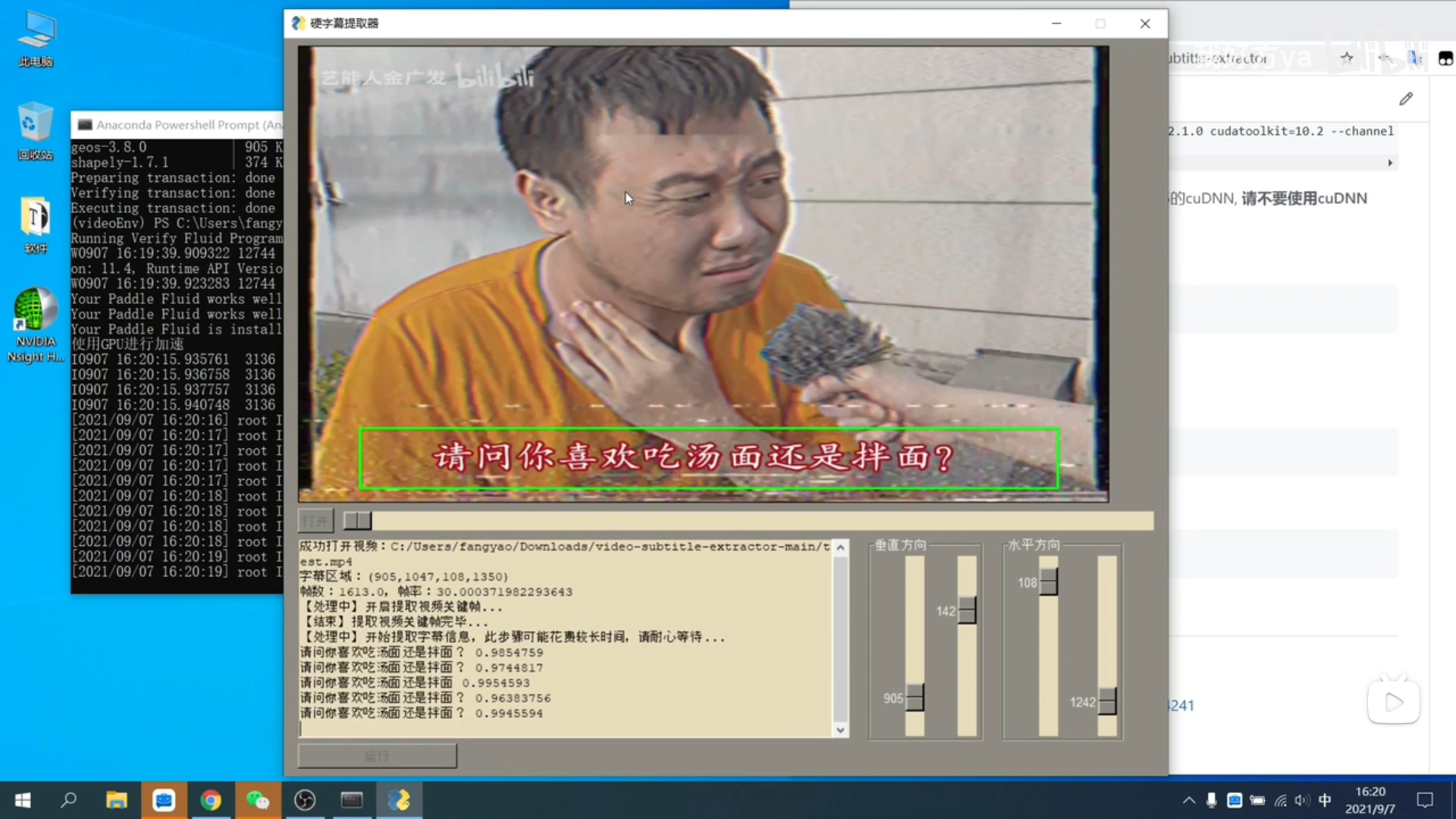](https://www.bilibili.com/video/bv11L4y1Y7Tj "GUP版本安装教程")
|
||||
|
||||
[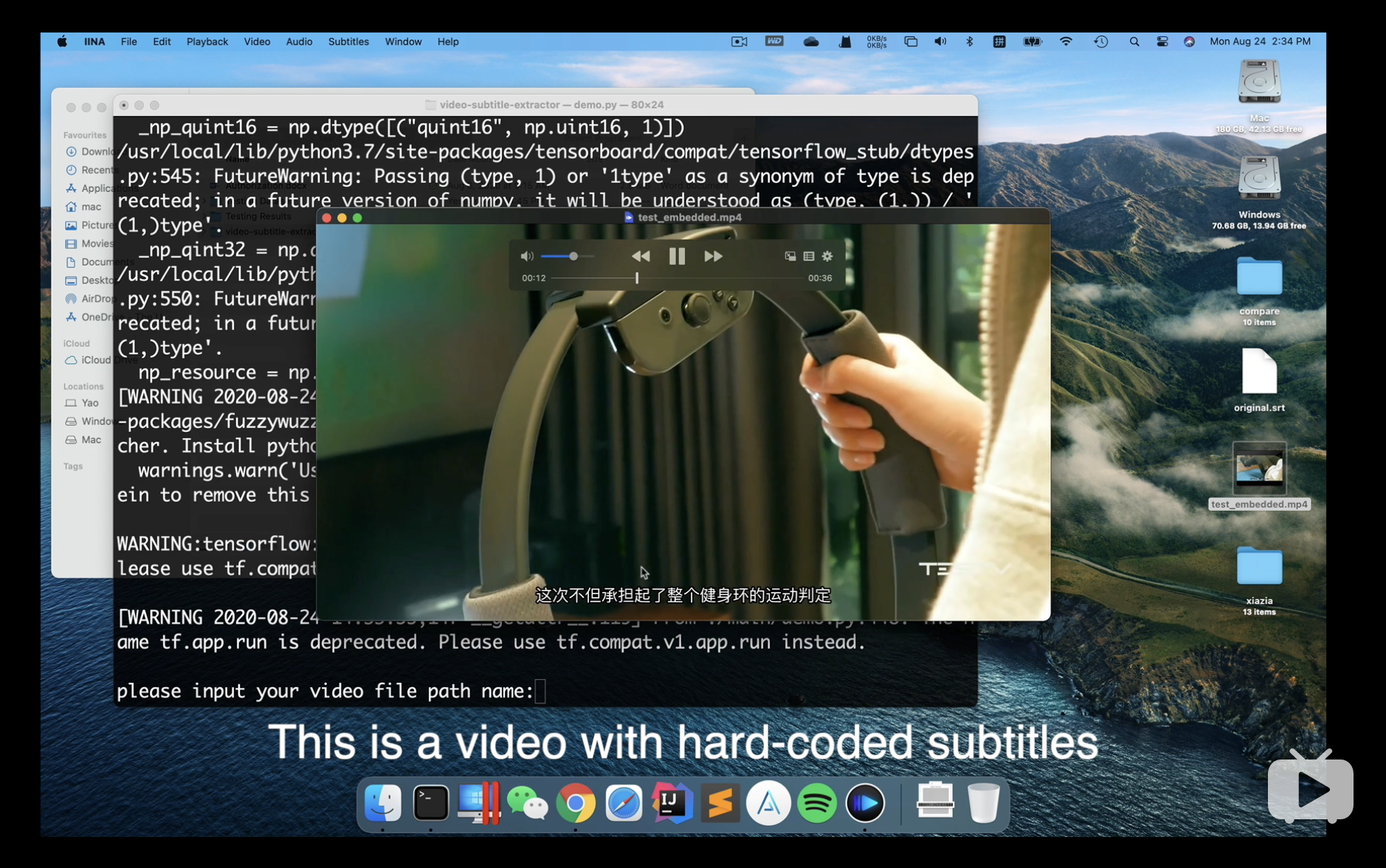](https://www.bilibili.com/video/BV1t5411h78J "Demo Video")
|
||||
|
||||
|
||||
## 在线运行
|
||||
@@ -47,36 +87,121 @@ video-subtitle-extractor是一款将视频中的硬字幕提取为外挂字幕
|
||||
|
||||
> PS: Google Colab只能运行CLI版本
|
||||
|
||||
## 使用说明
|
||||
|
||||
#### 1. (推荐) 下载安装Anaconda
|
||||
|
||||
<a href="https://www.anaconda.com/products/individual">https://www.anaconda.com/products/individual#Downloads</a>
|
||||
## 源码使用说明
|
||||
|
||||
#### 2. (推荐) 使用conda创建项目虚拟环境并激活环境 (建议创建虚拟环境运行,以免后续出现问题)
|
||||
#### 1. 下载安装Miniconda
|
||||
|
||||
```shell
|
||||
conda create --name videoEnv python=3.7
|
||||
conda activate videoEnv
|
||||
```
|
||||
- Windows: <a href="https://repo.anaconda.com/miniconda/Miniconda3-py38_4.11.0-Windows-x86_64.exe">Miniconda3-py38_4.11.0-Windows-x86_64.exe</a>
|
||||
|
||||
#### 3. 使用pip安装依赖文件
|
||||
|
||||
如果没有安装Anaconda,请确保你已经安装 python 3.7
|
||||
- MacOS:<a href="https://repo.anaconda.com/miniconda/Miniconda3-py38_4.11.0-MacOSX-x86_64.pkg">Miniconda3-py38_4.11.0-MacOSX-x86_64.pkg</a>
|
||||
|
||||
- mac用户, CPU用户:
|
||||
|
||||
```shell
|
||||
pip install -r requirements.txt
|
||||
```
|
||||
- Linux: <a href="https://repo.anaconda.com/miniconda/Miniconda3-py38_4.11.0-Linux-x86_64.sh">Miniconda3-py38_4.11.0-Linux-x86_64.sh</a>
|
||||
|
||||
- 有N卡的GPU用户: **要达到高精度的识别率请使用GPU版**
|
||||
#### 2. 安装依赖文件
|
||||
|
||||
```shell
|
||||
pip install -r requirements_gpu.txt
|
||||
```
|
||||
请确保你已经安装 python 3.8+,使用conda创建项目虚拟环境并激活环境 (建议创建虚拟环境运行,以免后续出现问题)
|
||||
|
||||
#### 4. 运行程序
|
||||
- CPU用户 (mac用户) :
|
||||
|
||||
- 安装依赖:
|
||||
|
||||
```shell
|
||||
conda create -n videoEnv python=3.8
|
||||
```
|
||||
|
||||
```shell
|
||||
conda activate videoEnv
|
||||
```
|
||||
|
||||
- GPU用户(有N卡): **要达到高精度的识别率请使用GPU版**
|
||||
|
||||
- 创建虚拟环境:
|
||||
|
||||
```shell
|
||||
conda create -n videoEnv python=3.8
|
||||
```
|
||||
|
||||
```shell
|
||||
conda activate videoEnv
|
||||
```
|
||||
|
||||
- 安装CUDA和cuDNN
|
||||
|
||||
<details>
|
||||
<summary>Linux用户</summary>
|
||||
<h5>(1) 下载CUDA 11.2</h5>
|
||||
<pre><code>wget https://developer.download.nvidia.com/compute/cuda/11.2.0/local_installers/cuda_11.2.0_460.27.04_linux.run</code></pre>
|
||||
<h5>(2) 安装CUDA 11.2</h5>
|
||||
<pre><code>sudo sh cuda_11.2.0_460.27.04_linux.run --override</code></pre>
|
||||
<p>1. 输入accept</p>
|
||||
<img src="https://z3.ax1x.com/2021/05/24/gv0AVU.png" width="500" alt="">
|
||||
<p>2. 选中CUDA Toolkit 11.2(如果你没有安装nvidia驱动则选中Driver,如果你已经安装了nvidia驱动请不要选中driver),之后选中install,回车</p>
|
||||
<img src="https://z3.ax1x.com/2021/10/11/5VnwfH.png" width="500" alt="">
|
||||
<p>3. 添加环境变量</p>
|
||||
<p>在 ~/.bashrc 加入以下内容</p>
|
||||
<pre><code># CUDA
|
||||
export PATH=/usr/local/cuda-11.2/bin${PATH:+:${PATH}}
|
||||
export LD_LIBRARY_PATH=/usr/local/cuda-11.2/lib64${LD_LIBRARY_PATH:+:${LD_LIBRARY_PATH}}</code></pre>
|
||||
<p>使其生效</p>
|
||||
<pre><code>source ~/.bashrc</code></pre>
|
||||
<h5>(3) 下载cuDNN 8.1.1</h5>
|
||||
<p>国内:<a href="https://github.91chi.fun/https://github.com//YaoFANGUK/video-subtitle-extractor/releases/download/0.2.0/cudnn-11.2-linux-x64-v8.1.1.33.tgz">cudnn-11.2-linux-x64-v8.1.1.33.tgz</a></p>
|
||||
<p>国外:<a href="https://github.com/YaoFANGUK/video-subtitle-extractor/releases/download/0.2.0/cudnn-11.2-linux-x64-v8.1.1.33.tgz">cudnn-11.2-linux-x64-v8.1.1.33.tgz</a></p>
|
||||
<h5>(4) 安装cuDNN 8.1.1</h5>
|
||||
<pre><code> tar -zxvf cudnn-11.2-linux-x64-v8.1.1.33.tgz
|
||||
sudo cp ./cuda/include/* /usr/local/cuda-11.2/include/
|
||||
sudo cp ./cuda/lib64/* /usr/local/cuda-11.2/lib64/
|
||||
sudo chmod a+r /usr/local/cuda-11.2/lib64/*
|
||||
sudo chmod a+r /usr/local/cuda-11.2/include/*</code></pre>
|
||||
</details>
|
||||
|
||||
<details>
|
||||
<summary>Windows用户</summary>
|
||||
<h5>(1) 下载CUDA 11.6</h5>
|
||||
<a href="https://developer.download.nvidia.com/compute/cuda/11.6.2/local_installers/cuda_11.6.2_511.65_windows.exe">cuda_11.6.2_511.65_windows.exe</a>
|
||||
<h5>(2) 安装CUDA 11.6</h5>
|
||||
<h5>(3) 下载cuDNN 8.2.1</h5>
|
||||
<p>国内:<a href="https://github.91chi.fun/https://github.com//YaoFANGUK/video-subtitle-extractor/releases/download/0.3.0/cudnn-11.3-windows-x64-v8.2.1.32.zip">cudnn-11.3-windows-x64-v8.2.1.32.zip</a></p>
|
||||
<p>国外:<a href="https://github.com//YaoFANGUK/video-subtitle-extractor/releases/download/0.3.0/cudnn-11.3-windows-x64-v8.2.1.32.zip">cudnn-11.3-windows-x64-v8.2.1.32.zip</a></p>
|
||||
<h5>(4) 安装cuDNN 8.2.1</h5>
|
||||
<p>
|
||||
将cuDNN解压后的cuda文件夹中的bin, include, lib目录下的文件复制到C:\Program Files\NVIDIA GPU Computing Toolkit\CUDA\v11.6\对应目录下
|
||||
</p>
|
||||
</details>
|
||||
|
||||
> 如果你使用的是3050/3060/3070/3080等安培架构的显卡,请使用最新的paddlepaddle版本以及最新的cuda 11.6
|
||||
|
||||
- 安装paddlepaddle:
|
||||
|
||||
- windows:
|
||||
|
||||
```shell
|
||||
python -m pip install paddlepaddle-gpu==2.2.2.post112 -f https://www.paddlepaddle.org.cn/whl/windows/mkl/avx/stable.html
|
||||
```
|
||||
|
||||
- Linux:
|
||||
|
||||
```shell
|
||||
python -m pip install paddlepaddle-gpu==2.2.2.post112 -f https://www.paddlepaddle.org.cn/whl/linux/mkl/avx/stable.html
|
||||
```
|
||||
|
||||
> 如果安装cuda 10.2,请对应安装7.6.5的cuDNN, **请不要使用cuDNN v8.x 和 cuda 10.2的组合**
|
||||
|
||||
> 如果安装cuda 11.2,请对应安装8.1.1的cuDNN, **30系列以上的显卡驱动可能不支持 cuda 11.2的安装**
|
||||
|
||||
|
||||
- 安装其他依赖:
|
||||
|
||||
```shell
|
||||
pip install -r requirements_gpu.txt
|
||||
```
|
||||
|
||||
|
||||
#### 3. 运行程序
|
||||
|
||||
- 运行图形化界面版本(GUI)
|
||||
|
||||
@@ -86,15 +211,28 @@ python gui.py
|
||||
|
||||
- 运行命令行版本(CLI)
|
||||
|
||||
```shell
|
||||
python main.py
|
||||
```shell
|
||||
python ./backend/main.py
|
||||
```
|
||||
|
||||
## Debug
|
||||
|
||||
- Windows下出现geos_c.dll错误
|
||||
|
||||
```integrationperformancetest
|
||||
## 常见问题与解决方案
|
||||
|
||||
#### 1. 运行不正常/没有结果/cuda及cudnn问题
|
||||
|
||||
解决方案:安装cuda与cudnn
|
||||
|
||||
|
||||
#### 2. CondaHTTPError
|
||||
|
||||
将项目中的.condarc放在用户目录下(C:\Users\\<你的用户名>),如果用户目录已经存在该文件则覆盖
|
||||
|
||||
解决方案:<a href="https://zhuanlan.zhihu.com/p/260034241">https://zhuanlan.zhihu.com/p/260034241</a>
|
||||
|
||||
#### 3. Windows下出现geos_c.dll错误
|
||||
|
||||
```text
|
||||
_lgeos = CDLL(os.path.join(sys.prefix, 'Library', 'bin', 'geos_c.dll'))
|
||||
File "C:\Users\Flavi\anaconda3\envs\subEnv\lib\ctypes\__init__.py", line 364, in __init__
|
||||
self._handle = _dlopen(self._name, mode)
|
||||
@@ -104,11 +242,38 @@ OSError: [WinError 126] 找不到指定的模块。
|
||||
解决方案:
|
||||
|
||||
1) 卸载Shapely
|
||||
|
||||
```shell
|
||||
pip uninstall Shapely -y
|
||||
```
|
||||
```
|
||||
|
||||
2) 使用conda重新安装Shapely
|
||||
|
||||
```shell
|
||||
conda install Shapely
|
||||
```
|
||||
|
||||
|
||||
#### 4. Nuitka打包代码闪退
|
||||
|
||||
使用Nuitka版本0.6.19,将conda虚拟环境Lib文件夹下site-packages的所有文件复制到dependencies文件夹中,把paddle库dataset下image.py的有关subprocess代码全部注释了,使用以下打包命令:
|
||||
|
||||
```shell
|
||||
python -m nuitka --standalone --mingw64 --include-data-dir=D:\vse\backend=backend --include-data-dir=D:\vse\dependencies=dependencies --nofollow-imports --windows-icon-from-ico=D:\vse\design\vse.ico --plugin-enable=tk-inter,multiprocessing --output-dir=out .\gui.py
|
||||
```
|
||||
|
||||
编译成单个文件
|
||||
```shell
|
||||
python -m nuitka --standalone --windows-disable-console --mingw64 --lto no --include-data-dir=D:\vse\backend=backend --include-data-dir=D:\vse\dependencies=dependencies --nofollow-imports --windows-icon-from-ico=D:\vse\design\vse.ico --plugin-enable=tk-inter --output-dir=out --onefile .\gui.py
|
||||
```
|
||||
|
||||
|
||||
|
||||
## 社区支持
|
||||
|
||||
#### Jetbrains 全家桶支持
|
||||
本项目开发所使用的IDE由Jetbrains支持。
|
||||
<div align=center>
|
||||
<a href="https://jb.gg/OpenSourceSupport"><img src="https://resources.jetbrains.com/storage/products/company/brand/logos/jb_beam.png" alt="JetBrains Logo (Main) logo." width="80"></a>
|
||||
</div>
|
||||
|
||||
@@ -1,20 +1,34 @@
|
||||
[简体中文](README.md) | English
|
||||
|
||||
## Introduction
|
||||

|
||||

|
||||
|
||||

|
||||

|
||||

|
||||
|
||||
video-subtitle-extractor is used to extract hard-coded subtitles and generate **srt** file. It includes the following implementations:
|
||||
video-subtitle-extractor aims at extracting hard-coded subtitles and generating **srt** file. It includes the following
|
||||
implementations:
|
||||
|
||||
- detect and extract subtitle frames (and keyframes using traditional graphic method)
|
||||
- detect the position (i.e. coordinates) of subtitles (as well as scene text if you want) (using deep learning method)
|
||||
- recognise the content of subtitles (i.e. converting graphic text into plain-text) (using deep learning method)
|
||||
- detect subtitle areas (i.e., coordinates) (as well as scene text if you want) (using deep learning algorithms)
|
||||
- recognise the content of subtitles (i.e., converting graphic text into plain-text) (using deep learning algorithms)
|
||||
- filter non-subtitle text
|
||||
- remove duplicated subtitle line
|
||||
- generate srt file
|
||||
- multiple language support: **Chinese/English**, **Traditional Chinese**, **Japanese**, **Korean**, **French**, **German**, **Russian**, **Spanish**, **Portuguese**, **Italian**
|
||||
- multiple mode:
|
||||
- **fast**: high extraction speed while few subtitle missing (**Recommended**)
|
||||
- **accurate**: no subtitle missing while low extraction speed
|
||||
|
||||
**Download**:
|
||||
|
||||
- Windows executable(a little bit slow when initial run): <a href="https://github.com/YaoFANGUK/video-subtitle-extractor/releases/download/0.3.0/vse.exe">vse.exe</a>
|
||||
|
||||
- Windows GPU version:<a href="https://github.com/YaoFANGUK/video-subtitle-extractor/releases/download/0.3.0/vse_windows_GPU.7z">vse_windows_GPU.7z</a>
|
||||
|
||||
- Windows CPU version:<a href="https://github.com/YaoFANGUK/video-subtitle-extractor/releases/download/0.3.0/vse_windows_CPU.zip">vse_windows_CPU.zip</a>
|
||||
|
||||
- MacOS:<a href="https://github.com/YaoFANGUK/video-subtitle-extractor/releases/download/0.1.0/vse_macOS_CPU.dmg">vse_macOS_CPU.dmg</a>
|
||||
|
||||
## Features
|
||||
|
||||
@@ -23,54 +37,66 @@ video-subtitle-extractor is used to extract hard-coded subtitles and generate **
|
||||
- For Command Line Interface(CLI) version, you don't need to manually set the location of subtitle. This program will automatically detect the subtitle area for you.
|
||||
- GPU support is available. You can install CUDA and cuDNN to speed up the detection and recognition process and even get more accurate results.
|
||||
|
||||
<img src="https://z3.ax1x.com/2021/04/09/cNrA1A.png" alt="demo">
|
||||
|
||||
> **Provide your suggestions to improve this project in ISSUES**
|
||||
|
||||
|
||||
## Demo
|
||||
|
||||
- Graphic User Interface:
|
||||
- Graphic User Interface (GUI):
|
||||
|
||||
<img src="https://z3.ax1x.com/2021/04/09/cNrA1A.png">
|
||||
<p style="text-align:center;"><img src="design/demo.gif" alt="demo.gif"/></p>
|
||||
|
||||
<div align="center">
|
||||
<img src="design/demo.gif"/>
|
||||
</div>
|
||||
|
||||
- Command Line Interface:
|
||||
- Command Line Interface (CLI):
|
||||
|
||||
[](https://www.bilibili.com/video/BV1t5411h78J "Demo Video")
|
||||
|
||||
|
||||
## Running Online
|
||||
|
||||
- **Google Colab Notebook with free GPU**: <a href="https://colab.research.google.com/github/YaoFANGUK/video-subtitle-extractor/blob/main/google_colab_en.ipynb"><img src="https://colab.research.google.com/assets/colab-badge.svg" alt="Open In Colab"></a>
|
||||
|
||||
> PS: can only run CLI version on Google Colab
|
||||
|
||||
|
||||
## Getting Started
|
||||
|
||||
#### 1. (Optional) Download and Install Anaconda
|
||||
#### 1. Download and Install Anaconda
|
||||
|
||||
<a href="https://www.anaconda.com/products/individual">https://www.anaconda.com/products/individual#Downloads</a>
|
||||
|
||||
#### 2. (Optional) create and activate a conda virtual environment
|
||||
#### 2. Install Dependencies
|
||||
|
||||
```shell
|
||||
conda create --name videoEnv python=3.7
|
||||
conda activate videoEnv
|
||||
```
|
||||
make sure you have python 3.8+ installed. Create and activate a conda virtual environment, and install dependencies.
|
||||
|
||||
#### 3. Install dependencies via pip
|
||||
- For Mac users and users who have CPU only:
|
||||
|
||||
make sure you have python 3.7 installed
|
||||
- Install dependencies:
|
||||
|
||||
```shell
|
||||
conda create -n videoEnv -f ./environment.yml
|
||||
```
|
||||
|
||||
- for macOS users and users who have CPU only:
|
||||
```shell
|
||||
conda activate videoEnv
|
||||
```
|
||||
|
||||
```shell
|
||||
pip install -r requirements.txt
|
||||
```
|
||||
- For users who have Nvidia graphic card: **GPU version can achieve better accuracy**
|
||||
|
||||
- for users who have Nvidia graphic card:
|
||||
- Install dependencies:
|
||||
|
||||
```shell
|
||||
pip install -r requirements_gpu.txt
|
||||
```
|
||||
```shell
|
||||
conda create -n videoEnv -f ./environment_gpu.yml
|
||||
```
|
||||
|
||||
#### 4. Running the program
|
||||
```shell
|
||||
conda activate videoEnv
|
||||
```
|
||||
|
||||
|
||||
#### 3. Running the program
|
||||
|
||||
- Run GUI version
|
||||
|
||||
@@ -81,18 +107,76 @@ python gui.py
|
||||
- Run CLI version
|
||||
|
||||
```shell
|
||||
python main.py
|
||||
python ./backend/main.py
|
||||
```
|
||||
|
||||
## Q & A
|
||||
|
||||
#### 1. Running Failure or Environment Problem
|
||||
|
||||
Solution: If you are using a nvidia ampere architecture graphics such as 3060/3070/3080, please use the latest PaddlePaddle version and CUDA 11.2, if you falied to install the GPU environment with Conda, please try manual installation:
|
||||
|
||||
- Install **CUDA 11.2** and **cuDNN 8.1.1**
|
||||
|
||||
<details>
|
||||
<summary>Linux</summary>
|
||||
<h5>(1) Download CUDA 11.2</h5>
|
||||
<pre><code>wget https://developer.download.nvidia.com/compute/cuda/11.2.0/local_installers/cuda_11.2.0_460.27.04_linux.run</code></pre>
|
||||
<h5>(2) Install CUDA 11.2</h5>
|
||||
<pre><code>sudo sh cuda_11.2.0_460.27.04_linux.run --override</code></pre>
|
||||
<p>1. Input accept</p>
|
||||
<img src="https://z3.ax1x.com/2021/05/24/gv0AVU.png" width="500" alt="">
|
||||
<p>2. make sure CUDA Toolkit 11.2 is chosen (If you have already installed driver, do not select Driver)</p>
|
||||
<img src="https://z3.ax1x.com/2021/10/11/5VnwfH.png" width="500" alt="">
|
||||
<p>3. Add environment variables</p>
|
||||
<p>add the following content in <strong>~/.bashrc</strong></p>
|
||||
<pre><code># CUDA
|
||||
export PATH=/usr/local/cuda-11.2/bin${PATH:+:${PATH}}
|
||||
export LD_LIBRARY_PATH=/usr/local/cuda-11.2/lib64${LD_LIBRARY_PATH:+:${LD_LIBRARY_PATH}}</code></pre>
|
||||
<p>Make sure it works</p>
|
||||
<pre><code>source ~/.bashrc</code></pre>
|
||||
<h5>(3) Download cuDNN 8.1.1</h5>
|
||||
<p><a href="https://github.com/YaoFANGUK/video-subtitle-extractor/releases/download/0.2.0/cudnn-11.2-linux-x64-v8.1.1.33.tgz">cudnn-11.2-linux-x64-v8.1.1.33.tgz</a></p>
|
||||
<h5>(4) Install cuDNN 8.1.1</h5>
|
||||
<pre><code> tar -zxvf cudnn-11.2-linux-x64-v8.1.1.33.tgz
|
||||
sudo cp ./cuda/include/* /usr/local/cuda-11.2/include/
|
||||
sudo cp ./cuda/lib64/* /usr/local/cuda-11.2/lib64/
|
||||
sudo chmod a+r /usr/local/cuda-11.2/lib64/*
|
||||
sudo chmod a+r /usr/local/cuda-11.2/include/*</code></pre>
|
||||
</details>
|
||||
|
||||
<details>
|
||||
<summary>Windows</summary>
|
||||
<h5>(1) Download CUDA 11.2</h5>
|
||||
<a href="https://developer.download.nvidia.com/compute/cuda/11.2.0/local_installers/cuda_11.2.0_460.89_win10.exe">cuda_11.2.0_460.89_win10.exe</a>
|
||||
<h5>(2) Install CUDA 11.2</h5>
|
||||
<h5>(3) Download cuDNN 8.1.1</h5>
|
||||
<p><a href="https://github.com/YaoFANGUK/video-subtitle-extractor/releases/download/0.2.0/cudnn-11.2-windows-x64-v8.1.1.33.zip">cudnn-11.2-windows-x64-v8.1.1.33.zip</a></p>
|
||||
<h5>(4) Install cuDNN 8.1.1</h5>
|
||||
<p>
|
||||
unzip "cudnn-11.2-windows-x64-v8.1.1.33.zip", then move all files in "bin, include, lib" in cuda
|
||||
directory to C:\Program Files\NVIDIA GPU Computing Toolkit\CUDA\v11.2\
|
||||
</p>
|
||||
</details>
|
||||
|
||||
|
||||
|
||||
## Run on Google Colab
|
||||
- Install paddlepaddle:
|
||||
|
||||
- **Google Colab Notebook with free GPU**: <a href="https://colab.research.google.com/github/YaoFANGUK/video-subtitle-extractor/blob/main/google_colab.ipynb"><img src="https://colab.research.google.com/assets/colab-badge.svg" alt="Open In Colab"></a>
|
||||
```shell
|
||||
conda install paddlepaddle-gpu==2.1.3 cudatoolkit=11.2 -c https://mirrors.tuna.tsinghua.edu.cn/anaconda/cloud/Paddle/ -c conda-forge
|
||||
```
|
||||
|
||||
## Debug
|
||||
> If you installed cuda 10.2,please install cuDNN 7.6.5 instead of cuDNN v8.x
|
||||
|
||||
- For Windows users, if you encounter errors related to "geos_c.dll"
|
||||
- Install other dependencies:
|
||||
|
||||
```shell
|
||||
pip install -r requirements_gpu.txt
|
||||
```
|
||||
|
||||
|
||||
#### 2. For Windows users, if you encounter errors related to "geos_c.dll"
|
||||
|
||||
```text
|
||||
_lgeos = CDLL(os.path.join(sys.prefix, 'Library', 'bin', 'geos_c.dll'))
|
||||
@@ -115,3 +199,14 @@ pip uninstall Shapely -y
|
||||
conda install Shapely
|
||||
```
|
||||
|
||||
|
||||
|
||||
|
||||
## Community Support
|
||||
|
||||
#### Jetbrains All Products Pack
|
||||
The IDE this project used is supported by Jetbrains
|
||||
<div align=center>
|
||||
<a href="https://jb.gg/OpenSourceSupport"><img src="https://resources.jetbrains.com/storage/products/company/brand/logos/jb_beam.png" alt="JetBrains Logo (Main) logo." width="80"></a>
|
||||
</div>
|
||||
|
||||
@@ -0,0 +1 @@
|
||||
|
||||
@@ -0,0 +1,159 @@
|
||||
# -*- coding: utf-8 -*-
|
||||
"""
|
||||
@Author : Fang Yao
|
||||
@Time : 2021/3/24 9:36 上午
|
||||
@FileName: config.py
|
||||
@desc: 项目配置文件,可以在这里调参,牺牲时间换取精确度,或者牺牲准确度换取时间
|
||||
"""
|
||||
import warnings
|
||||
warnings.filterwarnings("ignore", category=DeprecationWarning)
|
||||
import configparser
|
||||
import os
|
||||
import re
|
||||
import time
|
||||
from pathlib import Path
|
||||
from fsplit.filesplit import Filesplit
|
||||
from paddle import fluid
|
||||
from tools.constant import *
|
||||
|
||||
# 判断代码路径是否合法
|
||||
IS_LEGAL_PATH = True
|
||||
config = configparser.ConfigParser()
|
||||
MODE_CONFIG_PATH = os.path.join(os.path.dirname(os.path.dirname(__file__)), 'settings.ini')
|
||||
if not os.path.exists(os.path.join(os.path.dirname(os.path.dirname(__file__)), 'settings.ini')):
|
||||
# 如果没有配置文件,默认使用中文
|
||||
with open(os.path.join(os.path.dirname(os.path.dirname(__file__)), 'settings.ini'), mode='w', encoding='utf-8') as f:
|
||||
f.write('[DEFAULT]\n')
|
||||
f.write('Interface = 简体中文\n')
|
||||
f.write('Language = ch\n')
|
||||
f.write('Mode = fast')
|
||||
config.read(MODE_CONFIG_PATH, encoding='utf-8')
|
||||
|
||||
|
||||
interface_config = configparser.ConfigParser()
|
||||
INTERFACE_KEY_NAME_MAP = {
|
||||
'简体中文': 'ch',
|
||||
'繁體中文': 'ch_tra',
|
||||
'English': 'en',
|
||||
}
|
||||
interface_file = os.path.join(os.path.dirname(os.path.abspath(__file__)), 'interface',
|
||||
f"{INTERFACE_KEY_NAME_MAP[config['DEFAULT']['Interface']]}.ini")
|
||||
interface_config.read(interface_file, encoding='utf-8')
|
||||
# 设置识别语言
|
||||
REC_CHAR_TYPE = config['DEFAULT']['Language']
|
||||
|
||||
# 设置识别模式
|
||||
MODE_TYPE = config['DEFAULT']['Mode']
|
||||
ACCURATE_MODE_ON = False
|
||||
if MODE_TYPE == 'accurate':
|
||||
ACCURATE_MODE_ON = True
|
||||
if MODE_TYPE == 'fast':
|
||||
ACCURATE_MODE_ON = False
|
||||
|
||||
# --------------------- 请你不要改 start-----------------------------
|
||||
# 项目的base目录
|
||||
BASE_DIR = str(Path(os.path.abspath(__file__)).parent)
|
||||
# 是否包含中文
|
||||
if re.search(r"[\u4e00-\u9fa5]+", BASE_DIR):
|
||||
IS_LEGAL_PATH = False
|
||||
# 是否包含空格
|
||||
if re.search(r"\s", BASE_DIR):
|
||||
IS_LEGAL_PATH = False
|
||||
while not IS_LEGAL_PATH:
|
||||
print(interface_config['Main']['IllegalPathWarning'])
|
||||
time.sleep(3)
|
||||
# 模型文件目录
|
||||
# 文本检测模型
|
||||
DET_MODEL_BASE = os.path.join(BASE_DIR, '', 'models')
|
||||
DET_MODEL_PATH = os.path.join(DET_MODEL_BASE, 'ch_det')
|
||||
DET_MODEL_FAST_PATH = os.path.join(DET_MODEL_BASE, 'ch_det_fast')
|
||||
# 设置文本识别模型 + 字典
|
||||
REC_MODEL_BASE = os.path.join(BASE_DIR, '', 'models')
|
||||
# 默认文本识别模型为中文
|
||||
REC_MODEL_PATH = os.path.join(REC_MODEL_BASE, '', 'models', 'ch_rec')
|
||||
REC_MODEL_FAST_PATH = os.path.join(REC_MODEL_BASE, 'ch_rec_fast')
|
||||
# 默认字典路径为中文
|
||||
DICT_BASE = os.path.join(BASE_DIR, '', 'ppocr', 'utils', 'dict')
|
||||
DICT_PATH = os.path.join(BASE_DIR, '', 'ppocr', 'utils', 'ppocr_keys_v1.txt')
|
||||
|
||||
|
||||
# 如果设置了识别文本语言类型,则设置为对应的语言
|
||||
if REC_CHAR_TYPE in ('ch', 'japan', 'korean', 'en', 'EN_symbol', 'french', 'german', 'it', 'es', 'pt', 'ru', 'ar',
|
||||
'ta', 'ug', 'fa', 'ur', 'rs_latin', 'oc', 'rs_cyrillic', 'bg', 'uk', 'be', 'te', 'kn', 'ch_tra', 'hi', 'mr', 'ne', 'EN'):
|
||||
REC_MODEL_FAST_PATH = os.path.join(REC_MODEL_BASE, f'{REC_CHAR_TYPE}_rec_fast')
|
||||
if REC_CHAR_TYPE == 'en':
|
||||
REC_MODEL_PATH = os.path.join(BASE_DIR, '', 'models', 'ch_rec')
|
||||
DICT_PATH = os.path.join(BASE_DIR, '', 'ppocr', 'utils', 'dict', 'ch_dict.txt')
|
||||
else:
|
||||
REC_MODEL_PATH = os.path.join(BASE_DIR, '', 'models', f'{REC_CHAR_TYPE}_rec')
|
||||
DICT_PATH = os.path.join(BASE_DIR, '', 'ppocr', 'utils', 'dict', f'{REC_CHAR_TYPE}_dict.txt')
|
||||
if not os.path.exists(REC_MODEL_FAST_PATH):
|
||||
REC_MODEL_FAST_PATH = REC_MODEL_PATH
|
||||
|
||||
# 查看该路径下是否有文本模型识别完整文件,没有的话合并小文件生成完整文件
|
||||
if 'inference.pdiparams' not in (os.listdir(REC_MODEL_PATH)):
|
||||
fs = Filesplit()
|
||||
fs.merge(input_dir=REC_MODEL_PATH)
|
||||
# --------------------- 请你不要改 end-----------------------------
|
||||
|
||||
|
||||
# --------------------- 请根据自己的实际情况改 start-----------------------------
|
||||
# 是否使用GPU
|
||||
# 使用GPU可以提速20倍+,你要是有N卡你就改成 True
|
||||
USE_GPU = False
|
||||
# 如果paddlepaddle编译了gpu的版本
|
||||
if fluid.is_compiled_with_cuda():
|
||||
# 查看是否有可用的gpu
|
||||
if len(fluid.cuda_places()) > 0:
|
||||
# 如果有GPU则使用GPU
|
||||
USE_GPU = True
|
||||
|
||||
# 使用快速字幕检测算法时,背景颜色
|
||||
BG_MOD = BackgroundColor.DARK
|
||||
# 黑色背景被减矩阵阈值
|
||||
BG_VALUE_DARK = 200
|
||||
# 其他背景颜色被减矩阵阈值
|
||||
BG_VALUE_OTHER = 63
|
||||
# ROI比例
|
||||
ROI_RATE = 0.4
|
||||
|
||||
# 默认字幕出现区域为下方
|
||||
SUBTITLE_AREA = SubtitleArea.UNKNOWN
|
||||
|
||||
# 余弦相似度阈值
|
||||
# 数值越小生成的视频帧越少,相对提取速度更快但生成的字幕越不精准
|
||||
# 1表示最精准,每一帧视频帧都进行字幕检测与提取,生成的字幕最精准
|
||||
# 0.925表示,当视频帧1与视频帧2相似度高达92.5%时,视频帧2将直接pass,不字检测与提取视频帧2的字幕
|
||||
COSINE_SIMILARITY_THRESHOLD = 0.95 if SUBTITLE_AREA == SubtitleArea.UNKNOWN else 0.9
|
||||
|
||||
# 当前帧与之后的多少帧比较
|
||||
FRAME_COMPARE_TIMES = 10
|
||||
|
||||
# 每一秒抓取多少帧进行OCR识别
|
||||
EXTRACT_FREQUENCY = 3
|
||||
# 每几帧抽取一帧进行OCR识别
|
||||
EXTRACT_INTERVAL = 8
|
||||
|
||||
# 欧式距离相似值
|
||||
EUCLIDEAN_SIMILARITY_THRESHOLD = 0.9
|
||||
|
||||
# 容忍的像素点偏差
|
||||
PIXEL_TOLERANCE_Y = 50 # 允许检测框纵向偏差50个像素点
|
||||
PIXEL_TOLERANCE_X = 100 # 允许检测框横向偏差100个像素点
|
||||
|
||||
# 字幕区域偏移量
|
||||
SUBTITLE_AREA_DEVIATION_PIXEL = 50
|
||||
|
||||
# 最有可能出现的水印区域
|
||||
WATERMARK_AREA_NUM = 5
|
||||
|
||||
# 文本相似度阈值
|
||||
# 用于去重时判断两行字幕是不是同一行,这个值越高越严格。 e.g. 0.99表示100个字里面有99各个字一模一样才算相似
|
||||
# 采用动态算法实现相似度阈值判断: 对于短文本要求较低的阈值,对于长文本要求较高的阈值
|
||||
THRESHOLD_TEXT_SIMILARITY = 0.8
|
||||
|
||||
# 字幕提取中置信度低于0.8的不要
|
||||
DROP_SCORE = 0.8
|
||||
# --------------------- 请根据自己的实际情况改 end-----------------------------
|
||||
|
||||
os.environ['KMP_DUPLICATE_LIB_OK'] = 'True'
|
||||
@@ -0,0 +1,7 @@
|
||||
{
|
||||
"l'm": "I'm",
|
||||
"l just": "I just",
|
||||
"Let'sqo": "Let's go",
|
||||
"Iife": "life",
|
||||
"威筋": "威胁"
|
||||
}
|
||||
@@ -0,0 +1,62 @@
|
||||
[LanguageModeGUI]
|
||||
Title = 字幕提取器
|
||||
InterfaceLanguage = 选择语言:
|
||||
SubtitleLanguage = 选择视频字幕的语言:
|
||||
Mode = 选择识别模式:
|
||||
ModeFast = 快速
|
||||
ModeAccurate = 精准
|
||||
InterfaceDefault = 简体中文
|
||||
LanguageSimplifiedChinese = 简体中文
|
||||
LanguageTraditionalChinese = 繁体中文
|
||||
LanguageEnglish = 英语
|
||||
LanguageJapanese = 日语
|
||||
LanguageKorean = 韩语
|
||||
LanguageFrench = 法语
|
||||
LanguageGerman = 德语
|
||||
LanguageRussian = 俄语
|
||||
LanguageSpanish = 西班牙语
|
||||
LanguagePortuguese = 葡萄牙语
|
||||
LanguageItalian = 意大利语
|
||||
|
||||
[SubtitleExtractorGUI]
|
||||
Title = 字幕提取器
|
||||
Open = 打开
|
||||
AllFile = 所有文件
|
||||
Vertical = 垂直方向
|
||||
Horizontal = 水平方向
|
||||
Run = 运行
|
||||
Setting = 设置
|
||||
OpenVideoSuccess = 成功打开视频
|
||||
OpenVideoFirst = 请先打开视频
|
||||
SubtitleArea = 字幕区域
|
||||
|
||||
[Main]
|
||||
RecSubLang = 识别字幕语言
|
||||
RecMode = 识别模式
|
||||
IllegalPathWarning = 【警告】程序运行中断!路径不合法!请不要将程序放入带有空格和中文的路径下!!!请修改程序路径名后重新运行程序
|
||||
GPUSpeedUp = 使用GPU进行加速
|
||||
FrameCount = 帧数
|
||||
FrameRate = 帧率
|
||||
StartProcessFrame = 【处理中】开启提取视频关键帧...
|
||||
FinishProcessFrame = 【结束】提取视频关键帧完毕...
|
||||
StartFindSub = 【处理中】开始提取字幕信息,此步骤可能花费较长时间,请耐心等待...
|
||||
FinishFindSub = 【结束】完成字幕提取,生成原始字幕文件...
|
||||
StartDetectWaterMark = 【处理中】开始检测并过滤水印区域内容
|
||||
checkWaterMark = 视频是否存在水印区域,存在的话输入y,不存在的话输入n:
|
||||
FinishDetectWaterMark = 【结束】已经成功过滤水印区域内容
|
||||
StartDeleteNonSub = 【处理中】开始检测非字幕区域,并将非字幕区域的内容删除
|
||||
FinishDeleteNonSub = 【结束】已将非字幕区域的内容删除
|
||||
StartGenerateSub = 【处理中】开始生成字幕文件
|
||||
FinishGenerateSub = 【结束】字幕文件生成成功
|
||||
SubFrameNo = 字幕帧
|
||||
Elapse = 耗时
|
||||
ChooseSubArea = 请指定字幕区域
|
||||
WatchPicture = 请查看图片, 确定水印区域
|
||||
QuestionDelete = 区域中的字幕是否去除? 输入 "y" 或 "回车" 表示去除,输入"n"或其他表示不去除:
|
||||
FinishDelete = 已经删除该区域字幕...
|
||||
FinishWaterMarkFilter = 水印区域字幕过滤完毕...
|
||||
CheckSubArea = 请查看图片, 确定字幕区域是否正确:
|
||||
DeleteNoSubArea = 红色框区域外的字幕是否去除? 输入 "y" 或 "回车" 表示去除,输入"n"或其他表示不去除:
|
||||
FinishDeleteNoSubArea = 去除完毕
|
||||
SubLocation = 字幕文件生成位置:
|
||||
InputVideo = 请输入视频完整路径:
|
||||
@@ -0,0 +1,62 @@
|
||||
[LanguageModeGUI]
|
||||
Title = 字幕提取器
|
||||
InterfaceLanguage = 選擇語言:
|
||||
SubtitleLanguage = 選擇視頻字幕的語言:
|
||||
Mode = 選擇識別模式:
|
||||
ModeFast = 快速
|
||||
ModeAccurate = 精準
|
||||
InterfaceDefault = 繁體中文
|
||||
LanguageSimplifiedChinese = 簡體中文
|
||||
LanguageTraditionalChinese = 繁體中文
|
||||
LanguageEnglish = 英語
|
||||
LanguageJapanese = 日語
|
||||
LanguageKorean = 韓語
|
||||
LanguageFrench = 法語
|
||||
LanguageGerman = 德語
|
||||
LanguageRussian = 俄語
|
||||
LanguageSpanish = 西班牙語
|
||||
LanguagePortuguese = 葡萄牙語
|
||||
LanguageItalian = 意大利語
|
||||
|
||||
[SubtitleExtractorGUI]
|
||||
Title = 字幕提取器
|
||||
Open = 打開
|
||||
AllFile = 所有文件
|
||||
Vertical = 垂直方向
|
||||
Horizontal = 水平方向
|
||||
Run = 運行
|
||||
Setting = 設置
|
||||
OpenVideoSuccess = 成功打開視頻
|
||||
OpenVideoFirst = 請先打開視頻
|
||||
SubtitleArea = 字幕區域
|
||||
|
||||
[Main]
|
||||
RecSubLang = 識別字幕語言
|
||||
RecMode = 識別模式
|
||||
IllegalPathWarning = 【警告】程序運行中斷!路徑不合法!請不要將程序放入帶有空格和中文的路徑下!!!請修改程序路徑名後重新運行程序
|
||||
GPUSpeedUp = 使用GPU進行加速
|
||||
FrameCount = 幀數
|
||||
FrameRate = 幀率
|
||||
StartProcessFrame = 【處理中】開啟提取視頻關鍵幀...
|
||||
FinishProcessFrame = 【結束】提取視頻關鍵幀完畢...
|
||||
StartFindSub = 【處理中】開始提取字幕信息,此步驟可能花費較長時間,請耐心等待...
|
||||
FinishFindSub = 【結束】完成字幕提取,生成原始字幕文件...
|
||||
StartDetectWaterMark = 【處理中】開始檢測並過濾水印區域內容
|
||||
checkWaterMark = 視頻是否存在水印區域,存在的話輸入y,不存在的話輸入n:
|
||||
FinishDetectWaterMark = 【結束】已經成功過濾水印區域內容
|
||||
StartDeleteNonSub = 【處理中】開始檢測非字幕區域,並將非字幕區域的內容刪除
|
||||
FinishDeleteNonSub = 【結束】已將非字幕區域的內容刪除
|
||||
StartGenerateSub = 【處理中】開始生成字幕文件
|
||||
FinishGenerateSub = 【結束】字幕文件生成成功
|
||||
SubFrameNo = 字幕幀
|
||||
Elapse = 耗時
|
||||
ChooseSubArea = 請指定字幕區域
|
||||
WatchPicture = 請查看圖片, 確定水印區域
|
||||
QuestionDelete = 區域中的字幕是否去除? 輸入 "y" 或 "回車" 表示去除,輸入"n"或其他表示不去除:
|
||||
FinishDelete = 已經刪除該區域字幕...
|
||||
FinishWaterMarkFilter = 水印區域字幕過濾完畢...
|
||||
CheckSubArea = 請查看圖片, 確定字幕區域是否正確:
|
||||
DeleteNoSubArea = 紅色框區域外的字幕是否去除? 輸入 "y" 或 "回車" 表示去除,輸入"n"或其他表示不去除:
|
||||
FinishDeleteNoSubArea = 去除完畢
|
||||
SubLocation = 字幕文件生成位置:
|
||||
InputVideo = 請輸入視頻完整路徑:
|
||||
@@ -0,0 +1,62 @@
|
||||
[LanguageModeGUI]
|
||||
Title = Subtitle Extractor
|
||||
InterfaceLanguage = Choose Language:
|
||||
SubtitleLanguage = Subtitle Language:
|
||||
Mode = Choose Mode:
|
||||
ModeFast = fast
|
||||
ModeAccurate = accurate
|
||||
InterfaceDefault = English
|
||||
LanguageSimplifiedChinese = Simplified Chinese
|
||||
LanguageTraditionalChinese = Traditional Chinese
|
||||
LanguageEnglish = English
|
||||
LanguageJapanese = Japanese
|
||||
LanguageKorean = Korean
|
||||
LanguageFrench = French
|
||||
LanguageGerman = German
|
||||
LanguageRussian = Russian
|
||||
LanguageSpanish = Spanish
|
||||
LanguagePortuguese = Portuguese
|
||||
LanguageItalian = Italian
|
||||
|
||||
[SubtitleExtractorGUI]
|
||||
Title = Subtitle Extractor
|
||||
Open = Open
|
||||
AllFile = All Files
|
||||
Vertical = Vertical
|
||||
Horizontal = Horizontal
|
||||
Run = Run
|
||||
Setting = Settings
|
||||
OpenVideoSuccess = Successfully Open Video
|
||||
OpenVideoFirst = Please Open Video First
|
||||
SubtitleArea = Subtitle Area
|
||||
|
||||
[Main]
|
||||
RecSubLang = Subtitle Language
|
||||
RecMode = Mode
|
||||
IllegalPathWarning = [Warning] The program is interrupted! The path is illegal! Please do not put the program in a path with spaces and Chinese! ! ! Please modify the program path name and re-run the program
|
||||
GPUSpeedUp = Use GPU for acceleration
|
||||
FrameCount = Frame Count
|
||||
FrameRate = Frame Rate
|
||||
StartProcessFrame = [Processing] Start to extracting video keyframes...
|
||||
FinishProcessFrame = [Finished] Finished extracting video key frames...
|
||||
StartFindSub = [Processing] Start to extract subtitle information, this step may take a long time, please be patient...
|
||||
FinishFindSub = [Finished] Finish subtitle extraction, generate original subtitle file...
|
||||
StartDetectWaterMark = [Processing] Start to detect and filter watermark area
|
||||
checkWaterMark = Whether there is a watermark area in the video, if it exists, enter "y", if it does not exist, enter "n":
|
||||
FinishDetectWaterMark = [Finished] Watermark area has been successfully filtered
|
||||
StartDeleteNonSub = [Processing] Start to detect the non-subtitle area and delete the content in the non-subtitle area
|
||||
FinishDeleteNonSub = [Finished] Non-subtitle area has been deleted
|
||||
StartGenerateSub = [Processing] Start generating subtitle files
|
||||
FinishGenerateSub = [Finished] Subtitle file generated successfully
|
||||
SubFrameNo = Subtitle frame
|
||||
Elapse = elapse
|
||||
ChooseSubArea = Please specify subtitle area
|
||||
WatchPicture = Please check the picture to determine the watermark area
|
||||
QuestionDelete = Whether to remove the subtitles in the area? Input "y" or "Enter" to remove, input "n" or other means not to remove:
|
||||
FinishDelete = Subtitles in this area have been deleted...
|
||||
FinishWaterMarkFilter = The subtitles in the watermark area are filtered...
|
||||
CheckSubArea = Please check the picture to make sure the subtitle area is correct:
|
||||
DeleteNoSubArea = Are the subtitles outside the red box area removed? Input "y" or "Enter" to remove, input "n" or other means not to remove:
|
||||
FinishDeleteNoSubArea = Removed
|
||||
SubLocation = Subtitle file generated at:
|
||||
InputVideo = Please enter the full path of the video:
|
||||
@@ -5,44 +5,49 @@
|
||||
@FileName: main.py
|
||||
@desc: 主程序入口文件
|
||||
"""
|
||||
import re
|
||||
import os
|
||||
import random
|
||||
import shutil
|
||||
from collections import Counter
|
||||
import unicodedata
|
||||
|
||||
from threading import Thread
|
||||
from pathlib import Path
|
||||
import cv2
|
||||
from Levenshtein import ratio
|
||||
from PIL import Image
|
||||
from numpy import average, dot, linalg
|
||||
import numpy as np
|
||||
|
||||
from tqdm import tqdm
|
||||
import sys
|
||||
from paddle import fluid
|
||||
fluid.install_check.run_check()
|
||||
sys.path.insert(0, os.path.dirname(__file__))
|
||||
import config
|
||||
from backend.tools.infer import utility
|
||||
from backend.tools.infer.predict_system import TextSystem
|
||||
from config import SubtitleArea
|
||||
from config import interface_config
|
||||
from tools.reformat_en import reformat
|
||||
from tools.infer import utility
|
||||
from tools.infer.predict_det import TextDetector
|
||||
from tools.ocr import OcrRecogniser, get_coordinates
|
||||
from tools import subtitle_ocr
|
||||
from tools.constant import BackgroundColor
|
||||
import threading
|
||||
import platform
|
||||
import multiprocessing
|
||||
import time
|
||||
|
||||
|
||||
# 加载文本检测+识别模型
|
||||
def load_model():
|
||||
# 获取参数对象
|
||||
args = utility.parse_args()
|
||||
# 是否使用GPU加速
|
||||
args.use_gpu = config.USE_GPU
|
||||
if config.USE_GPU:
|
||||
# 设置文本检测模型路径
|
||||
args.det_model_dir = config.DET_MODEL_PATH
|
||||
# 设置文本识别模型路径
|
||||
args.rec_model_dir = config.REC_MODEL_PATH
|
||||
else:
|
||||
# 加载快速模型
|
||||
class SubtitleDetect:
|
||||
def __init__(self):
|
||||
# 获取参数对象
|
||||
args = utility.parse_args()
|
||||
args.det_algorithm = 'DB'
|
||||
args.det_model_dir = config.DET_MODEL_FAST_PATH
|
||||
# 加载快速模型
|
||||
# args.rec_model_dir = config.REC_MODEL_FAST_PATH
|
||||
args.rec_model_dir = config.REC_MODEL_PATH
|
||||
# 设置字典路径
|
||||
args.rec_char_dict_path = config.DICT_PATH
|
||||
self.text_detector = TextDetector(args)
|
||||
|
||||
return TextSystem(args)
|
||||
def detect_subtitle(self, img):
|
||||
dt_boxes, elapse = self.text_detector(img)
|
||||
return dt_boxes, elapse
|
||||
|
||||
|
||||
class SubtitleExtractor:
|
||||
@@ -51,11 +56,17 @@ class SubtitleExtractor:
|
||||
"""
|
||||
|
||||
def __init__(self, vd_path, sub_area=None):
|
||||
# 线程锁
|
||||
self.lock = threading.RLock()
|
||||
# 字幕区域位置
|
||||
self.sub_area = sub_area
|
||||
self.sub_detector = SubtitleDetect()
|
||||
# 视频路径
|
||||
self.video_path = vd_path
|
||||
self.video_cap = cv2.VideoCapture(vd_path)
|
||||
# 临时存储文件夹
|
||||
self.vd_name = Path(self.video_path).stem
|
||||
self.temp_output_dir = os.path.join(os.path.dirname(config.BASE_DIR), 'output', str(self.vd_name))
|
||||
# 视频帧总数
|
||||
self.frame_count = self.video_cap.get(cv2.CAP_PROP_FRAME_COUNT)
|
||||
# 视频帧率
|
||||
@@ -65,13 +76,12 @@ class SubtitleExtractor:
|
||||
self.frame_width = int(self.video_cap.get(cv2.CAP_PROP_FRAME_WIDTH))
|
||||
# 字幕出现区域
|
||||
self.subtitle_area = config.SUBTITLE_AREA
|
||||
print(f'帧数:{self.frame_count},帧率:{self.fps}')
|
||||
# 临时存储文件夹
|
||||
self.temp_output_dir = os.path.join(config.BASE_DIR, 'output')
|
||||
# 提取的视频帧储存目录
|
||||
self.frame_output_dir = os.path.join(self.temp_output_dir, 'frames')
|
||||
# 提取的字幕文件存储目录
|
||||
self.subtitle_output_dir = os.path.join(self.temp_output_dir, 'subtitle')
|
||||
# 定义vsf的字幕输出路径
|
||||
self.vsf_subtitle = os.path.join(self.subtitle_output_dir, 'raw_vsf.srt')
|
||||
# 不存在则创建文件夹
|
||||
if not os.path.exists(self.frame_output_dir):
|
||||
os.makedirs(self.frame_output_dir)
|
||||
@@ -79,87 +89,94 @@ class SubtitleExtractor:
|
||||
os.makedirs(self.subtitle_output_dir)
|
||||
# 提取的原始字幕文本存储路径
|
||||
self.raw_subtitle_path = os.path.join(self.subtitle_output_dir, 'raw.txt')
|
||||
# 自定义ocr对象
|
||||
self.ocr = OcrRecogniser()
|
||||
print(f"{interface_config['Main']['RecSubLang']}:{config.REC_CHAR_TYPE}")
|
||||
print(f"{interface_config['Main']['RecMode']}:{config.MODE_TYPE}")
|
||||
if config.USE_GPU:
|
||||
print(interface_config['Main']['GPUSpeedUp'])
|
||||
# 处理进度
|
||||
self.progress = 0
|
||||
# 是否完成
|
||||
self.isFinished = False
|
||||
# ocr队列
|
||||
self.subtitle_ocr_queue = None
|
||||
# vsf运行状态
|
||||
self.vsf_running = False
|
||||
|
||||
def run(self):
|
||||
"""
|
||||
运行整个提取视频的步骤
|
||||
"""
|
||||
print('【处理中】开启提取视频关键帧...')
|
||||
self.extract_frame_by_fps()
|
||||
print('【结束】提取视频关键帧完毕...')
|
||||
start_time = time.time()
|
||||
self.lock.acquire()
|
||||
print(f"{interface_config['Main']['FrameCount']}:{self.frame_count},{interface_config['Main']['FrameRate']}:{self.fps}")
|
||||
print(interface_config['Main']['StartProcessFrame'])
|
||||
|
||||
print('【处理中】开始提取字幕信息,此步骤可能花费较长时间,请耐心等待...')
|
||||
self.extract_subtitles()
|
||||
print('【结束】完成字幕提取,生成原始字幕文件...')
|
||||
subtitle_ocr_thread, self.subtitle_ocr_queue = subtitle_ocr.async_start(self.video_path, self.raw_subtitle_path, self.sub_area,
|
||||
config.REC_CHAR_TYPE, config.DROP_SCORE)
|
||||
if self.sub_area is not None:
|
||||
# 如果开启精准模式
|
||||
if config.ACCURATE_MODE_ON:
|
||||
# 开启精准模式并且有GPU加速
|
||||
if config.USE_GPU:
|
||||
self.extract_frame_by_det()
|
||||
else:
|
||||
self.extract_frame_by_fps()
|
||||
# 如果没有开启精准模式
|
||||
else:
|
||||
# 没有开启精准模式且操作系统为Windows
|
||||
if platform.system() == 'Windows':
|
||||
self.extract_frame_by_vsf()
|
||||
else:
|
||||
self.extract_frame_by_fps()
|
||||
else:
|
||||
self.extract_frame_by_fps()
|
||||
|
||||
duration_ms = (self.frame_count / self.fps) * 1000
|
||||
self.subtitle_ocr_queue.put((-1, duration_ms, -1, None, None, None))
|
||||
subtitle_ocr_thread.join()
|
||||
print(interface_config['Main']['FinishProcessFrame'])
|
||||
|
||||
print(interface_config['Main']['StartFindSub'])
|
||||
# 重置进度条
|
||||
self.progress = 0
|
||||
print(interface_config['Main']['FinishFindSub'])
|
||||
|
||||
if self.sub_area is None:
|
||||
print('【处理中】开始检测并过滤水印区域内容')
|
||||
print(interface_config['Main']['StartDetectWaterMark'])
|
||||
# 询问用户视频是否有水印区域
|
||||
user_input = input('视频是否存在水印区域,存在的话输入y,不存在的话输入n: ').strip()
|
||||
user_input = input(interface_config['Main']['checkWaterMark']).strip()
|
||||
if user_input == 'y':
|
||||
self.filter_watermark()
|
||||
print('【结束】已经成功过滤水印区域内容')
|
||||
print(interface_config['Main']['FinishDetectWaterMark'])
|
||||
else:
|
||||
print('-----------------------------')
|
||||
|
||||
if self.sub_area is None:
|
||||
print('【处理中】开始检测非字幕区域,并将非字幕区域的内容删除')
|
||||
print(interface_config['Main']['StartDeleteNonSub'])
|
||||
self.filter_scene_text()
|
||||
print('【结束】已将非字幕区域的内容删除')
|
||||
|
||||
print('【处理中】开始生成字幕文件')
|
||||
self.generate_subtitle_file()
|
||||
print('【结束】字幕文件生成成功')
|
||||
|
||||
def extract_frame(self):
|
||||
"""
|
||||
根据视频的分辨率,将高分辨的视频帧缩放到1280*720p
|
||||
根据字幕区域位置,将该图像区域截取出来
|
||||
"""
|
||||
# 删除缓存
|
||||
self.__delete_frame_cache()
|
||||
|
||||
# 当前视频帧的帧号
|
||||
frame_no = 0
|
||||
|
||||
while self.video_cap.isOpened():
|
||||
ret, frame = self.video_cap.read()
|
||||
# 如果读取视频帧失败(视频读到最后一帧)
|
||||
if not ret:
|
||||
break
|
||||
# 读取视频帧成功
|
||||
print(interface_config['Main']['FinishDeleteNonSub'])
|
||||
print(interface_config['Main']['StartGenerateSub'])
|
||||
# 判断是否开启精准模式
|
||||
if config.ACCURATE_MODE_ON:
|
||||
# 如果开启精准模式则使用原生字幕生成
|
||||
self.generate_subtitle_file()
|
||||
else:
|
||||
# 如果没有开启精准模式,则Windows平台默认使用vsf提取
|
||||
if platform.system() == 'Windows':
|
||||
self.generate_subtitle_file_vsf()
|
||||
else:
|
||||
frame_no += 1
|
||||
frame = self._frame_preprocess(frame)
|
||||
|
||||
# 帧名往前补零,后续用于排序与时间戳转换,补足8位
|
||||
# 一部10h电影,fps120帧最多也才1*60*60*120=432000 6位,所以8位足够
|
||||
filename = os.path.join(self.frame_output_dir, str(frame_no).zfill(8) + '.jpg')
|
||||
# 保存视频帧
|
||||
cv2.imwrite(filename, frame)
|
||||
|
||||
# 将当前帧与接下来的帧进行比较,计算余弦相似度
|
||||
compare_times = 0
|
||||
while self.video_cap.isOpened():
|
||||
ret, frame_next = self.video_cap.read()
|
||||
if ret:
|
||||
frame_no += 1
|
||||
frame_next = self._frame_preprocess(frame_next)
|
||||
cosine_distance = self._compute_image_similarity(Image.fromarray(frame),
|
||||
Image.fromarray(frame_next))
|
||||
compare_times += 1
|
||||
if compare_times == config.FRAME_COMPARE_TIMES:
|
||||
break
|
||||
if cosine_distance > config.COSINE_SIMILARITY_THRESHOLD:
|
||||
# 如果下一帧与当前帧的相似度大于设定阈值,则略过该帧
|
||||
continue
|
||||
# 如果相似度小于设定阈值,停止该while循环
|
||||
else:
|
||||
break
|
||||
else:
|
||||
break
|
||||
|
||||
self.video_cap.release()
|
||||
self.generate_subtitle_file()
|
||||
# 如果识别的字幕语言包含英文,则将英文分词
|
||||
if config.REC_CHAR_TYPE in ('ch', 'EN', 'en', 'ch_tra'):
|
||||
reformat(os.path.join(os.path.splitext(self.video_path)[0] + '.srt'))
|
||||
print(interface_config['Main']['FinishGenerateSub'], f"{round(time.time() - start_time, 2)}s")
|
||||
self.progress = 100
|
||||
self.isFinished = True
|
||||
# 删除缓存文件
|
||||
self.empty_cache()
|
||||
self.lock.release()
|
||||
|
||||
def extract_frame_by_fps(self):
|
||||
"""
|
||||
@@ -171,6 +188,7 @@ class SubtitleExtractor:
|
||||
# 当前视频帧的帧号
|
||||
frame_no = 0
|
||||
|
||||
duration_ms = (self.frame_count / self.fps) * 1000
|
||||
while self.video_cap.isOpened():
|
||||
ret, frame = self.video_cap.read()
|
||||
# 如果读取视频帧失败(视频读到最后一帧)
|
||||
@@ -178,96 +196,156 @@ class SubtitleExtractor:
|
||||
break
|
||||
# 读取视频帧成功
|
||||
else:
|
||||
total_ms = self.video_cap.get(cv2.CAP_PROP_POS_MSEC)
|
||||
if total_ms <= 0:
|
||||
total_ms = self._frameno_to_milliseconds(self.video_cap.get(cv2.CAP_PROP_POS_FRAMES))
|
||||
frame_no += 1
|
||||
frame = self._frame_preprocess(frame)
|
||||
|
||||
# 帧名往前补零,后续用于排序与时间戳转换,补足8位
|
||||
# 一部10h电影,fps120帧最多也才1*60*60*120=432000 6位,所以8位足够
|
||||
filename = os.path.join(self.frame_output_dir, str(frame_no).zfill(8) + '.jpg')
|
||||
# 保存视频帧
|
||||
cv2.imwrite(filename, frame)
|
||||
|
||||
self.subtitle_ocr_queue.put((total_ms, duration_ms, frame_no, None, None, self.subtitle_area))
|
||||
# 跳过剩下的帧
|
||||
for i in range(int(self.fps // config.EXTRACT_FREQUENCY) - 1):
|
||||
ret, _ = self.video_cap.read()
|
||||
if ret:
|
||||
frame_no += 1
|
||||
# 更新进度条
|
||||
self.progress = (frame_no / self.frame_count) * 100
|
||||
|
||||
self.video_cap.release()
|
||||
|
||||
def extract_subtitle_frame(self):
|
||||
def extract_frame_by_det(self):
|
||||
"""
|
||||
提取包含字幕的视频帧
|
||||
通过检测字幕区域位置提取字幕帧
|
||||
"""
|
||||
# 删除缓存
|
||||
self.__delete_frame_cache()
|
||||
# 获取字幕帧列表
|
||||
subtitle_frame_list = self._analyse_subtitle_frame()
|
||||
if subtitle_frame_list is None:
|
||||
print('请指定字幕区域')
|
||||
return
|
||||
cap = cv2.VideoCapture(self.video_path)
|
||||
idx = 0
|
||||
index = 0
|
||||
|
||||
while cap.isOpened():
|
||||
ret, frame = cap.read()
|
||||
# 当前视频帧的帧号
|
||||
frame_no = 0
|
||||
frame_lru_list = []
|
||||
frame_lru_list_max_size = 2
|
||||
ocr_args_list = []
|
||||
duration_ms = (self.frame_count / self.fps) * 1000
|
||||
compare_ocr_result_cache = {}
|
||||
tbar = tqdm(total=int(self.frame_count), unit='f', position=0, file=sys.__stdout__)
|
||||
while self.video_cap.isOpened():
|
||||
ret, frame = self.video_cap.read()
|
||||
# 如果读取视频帧失败(视频读到最后一帧)
|
||||
if not ret:
|
||||
break
|
||||
if idx in subtitle_frame_list and idx != 0:
|
||||
filename = os.path.join(self.frame_output_dir, str(idx).zfill(8) + '.jpg')
|
||||
frame = self._frame_preprocess(frame)
|
||||
cv2.imwrite(filename, frame)
|
||||
subtitle_frame_list.remove(idx)
|
||||
index += 1
|
||||
idx = idx + 1
|
||||
cap.release()
|
||||
total_ms = self.video_cap.get(cv2.CAP_PROP_POS_MSEC)
|
||||
if total_ms <= 0:
|
||||
total_ms = self._frameno_to_milliseconds(self.video_cap.get(cv2.CAP_PROP_POS_FRAMES))
|
||||
# 读取视频帧成功
|
||||
frame_no += 1
|
||||
dt_boxes, elapse = self.sub_detector.detect_subtitle(frame)
|
||||
has_subtitle = False
|
||||
if self.sub_area is not None:
|
||||
s_ymin, s_ymax, s_xmin, s_xmax = self.sub_area
|
||||
for box in dt_boxes:
|
||||
xmin, xmax, ymin, ymax = box[0], box[1], box[2], box[3]
|
||||
if (s_xmin <= xmin).any() and (xmax <= s_xmax).any() \
|
||||
and (s_ymin <= ymin).any() and (ymax <= s_ymax).any():
|
||||
has_subtitle = True
|
||||
break
|
||||
else:
|
||||
has_subtitle = len(dt_boxes) > 0
|
||||
if has_subtitle:
|
||||
# 如果frame列表大于等于2则取出最后两张图片
|
||||
if len(frame_lru_list) >= 2:
|
||||
frame_last, frame_last_no = frame_lru_list[-1]
|
||||
frame_last_2nd, frame_last_2nd_no = frame_lru_list[-2]
|
||||
if self._compare_ocr_result(compare_ocr_result_cache,
|
||||
frame_last, frame_last_no,
|
||||
frame_last_2nd, frame_last_2nd_no):
|
||||
if self._compare_ocr_result(compare_ocr_result_cache,
|
||||
frame_last, frame_last_no,
|
||||
frame, frame_no):
|
||||
# 如果当最后两帧内容一样,且最后一帧与当前帧一样
|
||||
# 删除最后一张,将当前帧设置为最后一帧
|
||||
ocr_args_list.pop(-1)
|
||||
frame_lru_list.pop(-1)
|
||||
frame_lru_list.append((frame, frame_no))
|
||||
ocr_args_list.append((total_ms, duration_ms, frame_no))
|
||||
|
||||
def extract_subtitles(self):
|
||||
while len(frame_lru_list) > frame_lru_list_max_size:
|
||||
frame_lru_list.pop(0)
|
||||
while len(ocr_args_list) > 1:
|
||||
ocr_info_total_ms, ocr_info_duration_ms, ocr_info_frame_no = ocr_args_list.pop(0)
|
||||
if frame_no in compare_ocr_result_cache:
|
||||
predict_result = compare_ocr_result_cache[frame_no]
|
||||
dt_box, rec_res = predict_result['dt_box'], predict_result['rec_res']
|
||||
else:
|
||||
dt_box, rec_res = None, None
|
||||
self.subtitle_ocr_queue.put((ocr_info_total_ms, ocr_info_duration_ms, ocr_info_frame_no,
|
||||
dt_box, rec_res, self.subtitle_area))
|
||||
self.progress = (frame_no / self.frame_count) * 100
|
||||
tbar.update(1)
|
||||
while len(ocr_args_list) > 0:
|
||||
ocr_info_total_ms, ocr_info_duration_ms, ocr_info_frame_no = ocr_args_list.pop(0)
|
||||
if frame_no in compare_ocr_result_cache:
|
||||
predict_result = compare_ocr_result_cache[frame_no]
|
||||
dt_box, rec_res = predict_result['dt_box'], predict_result['rec_res']
|
||||
else:
|
||||
dt_box, rec_res = None, None
|
||||
self.subtitle_ocr_queue.put((ocr_info_total_ms, ocr_info_duration_ms, ocr_info_frame_no,
|
||||
dt_box, rec_res, self.subtitle_area))
|
||||
self.video_cap.release()
|
||||
|
||||
def extract_frame_by_vsf(self):
|
||||
"""
|
||||
提取视频帧中的字幕信息,生成一个txt文件
|
||||
"""
|
||||
# 初始化文本识别对象
|
||||
text_recogniser = load_model()
|
||||
# 视频帧列表
|
||||
frame_list = [i for i in sorted(os.listdir(self.frame_output_dir)) if i.endswith('.jpg')]
|
||||
通过调用videoSubFinder获取字幕帧
|
||||
"""
|
||||
def count_process():
|
||||
duration_ms = (self.frame_count / self.fps) * 1000
|
||||
last_total_ms = 0
|
||||
processed_image = set()
|
||||
rgb_images_path = os.path.join(self.temp_output_dir, 'RGBImages')
|
||||
while self.vsf_running and not self.isFinished:
|
||||
if not os.path.exists(rgb_images_path):
|
||||
continue
|
||||
try:
|
||||
rgb_images = sorted(os.listdir(rgb_images_path))
|
||||
for rgb_image in rgb_images:
|
||||
if rgb_image in processed_image:
|
||||
continue
|
||||
processed_image.add(rgb_image)
|
||||
h, m, s, ms = rgb_image.split('__')[0].split('_')
|
||||
total_ms = int(ms) + int(s) * 1000 + int(m) * 60 * 1000 + int(h) * 60 * 60 * 1000
|
||||
if total_ms > last_total_ms:
|
||||
self.subtitle_ocr_queue.put((total_ms, duration_ms, -1, None, None, self.subtitle_area))
|
||||
last_total_ms = total_ms
|
||||
if total_ms / duration_ms >= 1:
|
||||
self.progress = 100
|
||||
return
|
||||
else:
|
||||
self.progress = (total_ms / duration_ms) * 100
|
||||
# 文件被清理了
|
||||
except FileNotFoundError:
|
||||
return
|
||||
|
||||
# 删除缓存
|
||||
if os.path.exists(self.raw_subtitle_path):
|
||||
os.remove(self.raw_subtitle_path)
|
||||
# 新建文件
|
||||
f = open(self.raw_subtitle_path, mode='w+', encoding='utf-8')
|
||||
|
||||
for frame in frame_list:
|
||||
# 读取视频帧
|
||||
img = cv2.imread(os.path.join(self.frame_output_dir, frame))
|
||||
# 获取检测结果
|
||||
dt_box, rec_res = text_recogniser(img)
|
||||
# 获取文本坐标
|
||||
coordinates = self.__get_coordinates(dt_box)
|
||||
# 将结果写入txt文本中
|
||||
text_res = [(res[0], res[1]) for res in rec_res]
|
||||
for content, coordinate in zip(text_res, coordinates):
|
||||
if self.sub_area is not None:
|
||||
s_ymin = self.sub_area[0]
|
||||
s_ymax = self.sub_area[1]
|
||||
s_xmin = self.sub_area[2]
|
||||
s_xmax = self.sub_area[3]
|
||||
xmin = coordinate[0]
|
||||
xmax = coordinate[1]
|
||||
ymin = coordinate[2]
|
||||
ymax = coordinate[3]
|
||||
if s_xmin <= xmin and xmax <= s_xmax and s_ymin <= ymin and ymax <= s_ymax:
|
||||
print(content[0], content[1])
|
||||
if content[1] > config.DROP_SCORE:
|
||||
f.write(f'{os.path.splitext(frame)[0]}\t'
|
||||
f'{coordinate}\t'
|
||||
f'{content[0]}\n')
|
||||
else:
|
||||
f.write(f'{os.path.splitext(frame)[0]}\t'
|
||||
f'{coordinate}\t'
|
||||
f'{content[0]}\n')
|
||||
# 关闭文件
|
||||
f.close()
|
||||
self.__delete_frame_cache()
|
||||
# 定义videoSubFinder所在路径
|
||||
path_vsf = os.path.join(config.BASE_DIR, '', 'subfinder', 'VideoSubFinderWXW.exe')
|
||||
# :图像上半部分所占百分比,取值【0-1】
|
||||
top_end = 1 - self.sub_area[0] / self.frame_height
|
||||
# bottom_end:图像下半部分所占百分比,取值【0-1】
|
||||
bottom_end = 1 - self.sub_area[1] / self.frame_height
|
||||
# left_end:图像左半部分所占百分比,取值【0-1】
|
||||
left_end = self.sub_area[2] / self.frame_width
|
||||
# re:图像右半部分所占百分比,取值【0-1】
|
||||
right_end = self.sub_area[3] / self.frame_width
|
||||
cpu_count = max(int(multiprocessing.cpu_count() * 2 / 3), 1)
|
||||
if cpu_count < 4:
|
||||
cpu_count = max(multiprocessing.cpu_count() - 1, 1)
|
||||
# 定义执行命令
|
||||
cmd = f"{path_vsf} -c -r -i \"{self.video_path}\" -o \"{self.temp_output_dir}\" -ces \"{self.vsf_subtitle}\" "
|
||||
cmd += f"-te {top_end} -be {bottom_end} -le {left_end} -re {right_end} -nthr {cpu_count} -nocrthr {cpu_count}"
|
||||
self.vsf_running = True
|
||||
# 计算进度
|
||||
Thread(target=count_process, daemon=True).start()
|
||||
import subprocess
|
||||
subprocess.run(cmd, shell=True, stdin=subprocess.PIPE, stdout=subprocess.PIPE, stderr=subprocess.PIPE)
|
||||
self.vsf_running = False
|
||||
|
||||
def filter_watermark(self):
|
||||
"""
|
||||
@@ -276,11 +354,20 @@ class SubtitleExtractor:
|
||||
# 获取潜在水印区域
|
||||
watermark_areas = self._detect_watermark_area()
|
||||
|
||||
# 从frame目录随机读取一张图片,将所水印区域标记出来,用户看图判断是否是水印区域
|
||||
frame_path = os.path.join(self.frame_output_dir,
|
||||
random.choice(
|
||||
[i for i in sorted(os.listdir(self.frame_output_dir)) if i.endswith('.jpg')]))
|
||||
sample_frame = cv2.imread(frame_path)
|
||||
# 随机选择一帧, 将所水印区域标记出来,用户看图判断是否是水印区域
|
||||
cap = cv2.VideoCapture(self.video_path)
|
||||
ret, sample_frame = False, None
|
||||
for i in range(10):
|
||||
frame_no = random.randint(int(self.frame_count * 0.1), int(self.frame_count * 0.9))
|
||||
cap.set(cv2.CAP_PROP_POS_FRAMES, frame_no)
|
||||
ret, sample_frame = cap.read()
|
||||
if ret:
|
||||
break
|
||||
cap.release()
|
||||
|
||||
if not ret:
|
||||
print("Error in filter_watermark: reading frame from video")
|
||||
return
|
||||
|
||||
# 给潜在的水印区域编号
|
||||
area_num = ['E', 'D', 'C', 'B', 'A']
|
||||
@@ -301,12 +388,11 @@ class SubtitleExtractor:
|
||||
|
||||
sample_frame_file_path = os.path.join(os.path.dirname(self.frame_output_dir), 'watermark_area.jpg')
|
||||
cv2.imwrite(sample_frame_file_path, sample_frame)
|
||||
print(f'请查看图片, 确定水印区域: {sample_frame_file_path}')
|
||||
print(f"{interface_config['Main']['WatchPicture']}: {sample_frame_file_path}")
|
||||
|
||||
area_num = ['E', 'D', 'C', 'B', 'A']
|
||||
for watermark_area in watermark_areas:
|
||||
user_input = input(f'是否去除区域{area_num.pop()}{str(watermark_area)}中的字幕?'
|
||||
f'\n输入 "y" 或 "回车" 表示去除,输入"n"或其他表示不去除: ').strip()
|
||||
user_input = input(f"{area_num.pop()}{str(watermark_area)} {interface_config['Main']['QuestionDelete']}").strip()
|
||||
if user_input == 'y' or user_input == '\n':
|
||||
with open(self.raw_subtitle_path, mode='r+', encoding='utf-8') as f:
|
||||
content = f.readlines()
|
||||
@@ -315,8 +401,8 @@ class SubtitleExtractor:
|
||||
if i.find(str(watermark_area[0])) == -1:
|
||||
f.write(i)
|
||||
f.truncate()
|
||||
print(f'已经删除该区域字幕...')
|
||||
print('水印区域字幕过滤完毕...')
|
||||
print(interface_config['Main']['FinishDelete'])
|
||||
print(interface_config['Main']['FinishWaterMarkFilter'])
|
||||
# 删除缓存
|
||||
if os.path.exists(sample_frame_file_path):
|
||||
os.remove(sample_frame_file_path)
|
||||
@@ -328,11 +414,20 @@ class SubtitleExtractor:
|
||||
# 获取潜在字幕区域
|
||||
subtitle_area = self._detect_subtitle_area()[0][0]
|
||||
|
||||
# 从frame目录随机读取一张图片,将所水印区域标记出来,用户看图判断是否是水印区域
|
||||
frame_path = os.path.join(self.frame_output_dir,
|
||||
random.choice(
|
||||
[i for i in sorted(os.listdir(self.frame_output_dir)) if i.endswith('.jpg')]))
|
||||
sample_frame = cv2.imread(frame_path)
|
||||
# 随机选择一帧,将所水印区域标记出来,用户看图判断是否是水印区域
|
||||
cap = cv2.VideoCapture(self.video_path)
|
||||
ret, sample_frame = False, None
|
||||
for i in range(10):
|
||||
frame_no = random.randint(int(self.frame_count * 0.1), int(self.frame_count * 0.9))
|
||||
cap.set(cv2.CAP_PROP_POS_FRAMES, frame_no)
|
||||
ret, sample_frame = cap.read()
|
||||
if ret:
|
||||
break
|
||||
cap.release()
|
||||
|
||||
if not ret:
|
||||
print("Error in filter_scene_text: reading frame from video")
|
||||
return
|
||||
|
||||
# 为了防止有双行字幕,根据容忍度,将字幕区域y范围加高
|
||||
ymin = abs(subtitle_area[0] - config.SUBTITLE_AREA_DEVIATION_PIXEL)
|
||||
@@ -341,10 +436,9 @@ class SubtitleExtractor:
|
||||
cv2.rectangle(sample_frame, pt1=(0, ymin), pt2=(sample_frame.shape[1], ymax), color=(0, 0, 255), thickness=3)
|
||||
sample_frame_file_path = os.path.join(os.path.dirname(self.frame_output_dir), 'subtitle_area.jpg')
|
||||
cv2.imwrite(sample_frame_file_path, sample_frame)
|
||||
print(f'请查看图片, 确定字幕区域是否正确: {sample_frame_file_path}')
|
||||
print(f"{interface_config['Main']['CheckSubArea']} {sample_frame_file_path}")
|
||||
|
||||
user_input = input(f'是否去除红色框区域外{(ymin, ymax)}的字幕?'
|
||||
f'\n输入 "y" 或 "回车" 表示去除,输入"n"或其他表示不去除: ').strip()
|
||||
user_input = input(f"{(ymin, ymax)} {interface_config['Main']['DeleteNoSubArea']}").strip()
|
||||
if user_input == 'y' or user_input == '\n':
|
||||
with open(self.raw_subtitle_path, mode='r+', encoding='utf-8') as f:
|
||||
content = f.readlines()
|
||||
@@ -355,7 +449,7 @@ class SubtitleExtractor:
|
||||
if ymin <= i_ymin and i_ymax <= ymax:
|
||||
f.write(i)
|
||||
f.truncate()
|
||||
print('去除完毕')
|
||||
print(interface_config['Main']['FinishDeleteNoSubArea'])
|
||||
# 删除缓存
|
||||
if os.path.exists(sample_frame_file_path):
|
||||
os.remove(sample_frame_file_path)
|
||||
@@ -365,7 +459,6 @@ class SubtitleExtractor:
|
||||
生成srt格式的字幕文件
|
||||
"""
|
||||
subtitle_content = self._remove_duplicate_subtitle()
|
||||
print(os.path.splitext(self.video_path)[0])
|
||||
srt_filename = os.path.join(os.path.splitext(self.video_path)[0] + '.srt')
|
||||
# 保存持续时间不足1秒的字幕行,用于后续处理
|
||||
post_process_subtitle = []
|
||||
@@ -382,10 +475,43 @@ class SubtitleExtractor:
|
||||
frame_content = content[2]
|
||||
subtitle_line = f'{line_code}\n{frame_start} --> {frame_end}\n{frame_content}\n'
|
||||
f.write(subtitle_line)
|
||||
print(f'字幕文件生成位置:{srt_filename}')
|
||||
print(f"{interface_config['Main']['SubLocation']} {srt_filename}")
|
||||
# 返回持续时间低于1s的字幕行
|
||||
return post_process_subtitle
|
||||
|
||||
def generate_subtitle_file_vsf(self):
|
||||
try:
|
||||
subtitle_timestamp = []
|
||||
with open(self.vsf_subtitle, mode='r', encoding='utf-8') as f:
|
||||
lines = f.readlines()
|
||||
timestamp = []
|
||||
frame_no = []
|
||||
for line in lines:
|
||||
if re.match(r'^\d{1,}$', line):
|
||||
frame_no.append(line.replace('\n', '').replace('\r', '').zfill(8))
|
||||
if re.match(r'^\d{2,}:\d{2,}:\d{2,},\d{1,3}.*', line):
|
||||
timestamp.append(line.replace('\n', '').replace('\r', ''))
|
||||
for i in zip(frame_no, timestamp):
|
||||
subtitle_timestamp.append(i)
|
||||
subtitle_content = self._remove_duplicate_subtitle()
|
||||
final_subtitle = []
|
||||
for sc in subtitle_content:
|
||||
frame_no = sc[0]
|
||||
content = sc[2]
|
||||
for st in subtitle_timestamp:
|
||||
if st[0] == frame_no:
|
||||
timestamp = st[1]
|
||||
final_subtitle.append((timestamp, content))
|
||||
srt_filename = os.path.join(os.path.splitext(self.video_path)[0] + '.srt')
|
||||
with open(srt_filename, mode='w', encoding='utf-8') as f:
|
||||
for i, subtitle_line in enumerate(final_subtitle):
|
||||
f.write(f'{i + 1}\n')
|
||||
f.write(f'{subtitle_line[0]}\n')
|
||||
f.write(f'{subtitle_line[1]}\n')
|
||||
print(f"{interface_config['Main']['SubLocation']} {srt_filename}")
|
||||
except FileNotFoundError:
|
||||
self.generate_subtitle_file()
|
||||
|
||||
def _analyse_subtitle_frame(self):
|
||||
"""
|
||||
使用简单的图像算法找出包含字幕的视频帧
|
||||
@@ -406,7 +532,7 @@ class SubtitleExtractor:
|
||||
# 截取字幕部分
|
||||
frame = frame[s_ymin:s_ymax, s_xmin:s_xmax]
|
||||
h, w = frame.shape[0:2]
|
||||
if config.BG_MOD == config.BackgroundColor.DARK: # 深色背景
|
||||
if config.BG_MOD == BackgroundColor.DARK: # 深色背景
|
||||
minuend = np.full(h * w, config.BG_VALUE_DARK) # 被减矩阵
|
||||
else:
|
||||
minuend = np.full(h * w, config.BG_VALUE_OTHER) # 被减矩阵
|
||||
@@ -495,109 +621,45 @@ class SubtitleExtractor:
|
||||
f.close()
|
||||
return Counter(y_coordinates_list).most_common(1)
|
||||
|
||||
def _frame_preprocess(self, frame):
|
||||
"""
|
||||
将视频帧进行裁剪
|
||||
"""
|
||||
# 对于分辨率大于1920*1080的视频,将其视频帧进行等比缩放至1280*720进行识别
|
||||
# paddlepaddle会将图像压缩为640*640
|
||||
# if self.frame_width > 1280:
|
||||
# scale_rate = round(float(1280 / self.frame_width), 2)
|
||||
# frame = cv2.resize(frame, None, fx=scale_rate, fy=scale_rate, interpolation=cv2.INTER_AREA)
|
||||
cropped = int(frame.shape[0] // 2)
|
||||
# 如果字幕出现的区域在下部分
|
||||
if self.subtitle_area == SubtitleArea.LOWER_PART:
|
||||
# 将视频帧切割为下半部分
|
||||
frame = frame[cropped:]
|
||||
# 如果字幕出现的区域在上半部分
|
||||
elif self.subtitle_area == SubtitleArea.UPPER_PART:
|
||||
# 将视频帧切割为下半部分
|
||||
frame = frame[:cropped]
|
||||
return frame
|
||||
|
||||
def _frame_to_timecode(self, frame_no):
|
||||
"""
|
||||
将视频帧转换成时间
|
||||
:param frame_no: 视频的帧号,i.e. 第几帧视频帧
|
||||
:returns: SMPTE格式时间戳 as string, 如'01:02:12:32' 或者 '01:02:12;32'
|
||||
"""
|
||||
# 将小数点后两位的数字丢弃
|
||||
tmp = str(self.fps).split('.')
|
||||
tmp[1] = tmp[1][:2]
|
||||
frame_rate = float('.'.join(tmp))
|
||||
|
||||
drop = False
|
||||
|
||||
if frame_rate in [29.97, 59.94]:
|
||||
drop = True
|
||||
|
||||
# 将fps就近取整,如29.97或59.94取整为30和60
|
||||
fps_int = int(round(frame_rate))
|
||||
# 然后添加drop frames进行补偿
|
||||
|
||||
if drop:
|
||||
# drop-frame-mode
|
||||
# 每分钟添加两个fake frames,每十分钟的时候不添加
|
||||
# 1分钟内,non-drop和drop的时间戳对比
|
||||
# frame: 1795 non-drop: 00:00:59:25 drop: 00:00:59;25
|
||||
# frame: 1796 non-drop: 00:00:59:26 drop: 00:00:59;26
|
||||
# frame: 1797 non-drop: 00:00:59:27 drop: 00:00:59;27
|
||||
# frame: 1798 non-drop: 00:00:59:28 drop: 00:00:59;28
|
||||
# frame: 1799 non-drop: 00:00:59:29 drop: 00:00:59;29
|
||||
# frame: 1800 non-drop: 00:01:00:00 drop: 00:01:00;02
|
||||
# frame: 1801 non-drop: 00:01:00:01 drop: 00:01:00;03
|
||||
# frame: 1802 non-drop: 00:01:00:02 drop: 00:01:00;04
|
||||
# frame: 1803 non-drop: 00:01:00:03 drop: 00:01:00;05
|
||||
# frame: 1804 non-drop: 00:01:00:04 drop: 00:01:00;06
|
||||
# frame: 1805 non-drop: 00:01:00:05 drop: 00:01:00;07
|
||||
#
|
||||
# 10分钟内,non-drop和drop的时间戳对比
|
||||
#
|
||||
# frame: 17977 non-drop: 00:09:59:07 drop: 00:09:59;25
|
||||
# frame: 17978 non-drop: 00:09:59:08 drop: 00:09:59;26
|
||||
# frame: 17979 non-drop: 00:09:59:09 drop: 00:09:59;27
|
||||
# frame: 17980 non-drop: 00:09:59:10 drop: 00:09:59;28
|
||||
# frame: 17981 non-drop: 00:09:59:11 drop: 00:09:59;29
|
||||
# frame: 17982 non-drop: 00:09:59:12 drop: 00:10:00;00
|
||||
# frame: 17983 non-drop: 00:09:59:13 drop: 00:10:00;01
|
||||
# frame: 17984 non-drop: 00:09:59:14 drop: 00:10:00;02
|
||||
# frame: 17985 non-drop: 00:09:59:15 drop: 00:10:00;03
|
||||
# frame: 17986 non-drop: 00:09:59:16 drop: 00:10:00;04
|
||||
# frame: 17987 non-drop: 00:09:59:17 drop: 00:10:00;05
|
||||
|
||||
# 计算29.97 std NTSC工作流程的丢帧数。1分钟一共有30*60 = 1800 frames
|
||||
|
||||
FRAMES_IN_ONE_MINUTE = 1800 - 2
|
||||
|
||||
FRAMES_IN_TEN_MINUTES = (FRAMES_IN_ONE_MINUTE * 10) - 2
|
||||
|
||||
ten_minute_chunks = frame_no / FRAMES_IN_TEN_MINUTES
|
||||
one_minute_chunks = frame_no % FRAMES_IN_TEN_MINUTES
|
||||
|
||||
ten_minute_part = 18 * ten_minute_chunks
|
||||
one_minute_part = 2 * ((one_minute_chunks - 2) / FRAMES_IN_ONE_MINUTE)
|
||||
|
||||
if one_minute_part < 0:
|
||||
one_minute_part = 0
|
||||
|
||||
# 添加额外的帧
|
||||
frame_no += ten_minute_part + one_minute_part
|
||||
|
||||
# 对于60 fps的drop frame计算, 添加两倍的帧数
|
||||
if fps_int == 60:
|
||||
frame_no = frame_no * 2
|
||||
|
||||
smpte_token = "," # 也可能为;号
|
||||
|
||||
# 设置当前帧号
|
||||
cap = cv2.VideoCapture(self.video_path)
|
||||
cap.set(cv2.CAP_PROP_POS_FRAMES, frame_no)
|
||||
ret, _ = cap.read()
|
||||
# 获取当前帧号对应的时间戳
|
||||
if ret:
|
||||
milliseconds = cap.get(cv2.CAP_PROP_POS_MSEC)
|
||||
if milliseconds <= 0:
|
||||
return '{0:02d}:{1:02d}:{2:02d},{3:02d}'.format(int(frame_no / (3600 * self.fps)),
|
||||
int(frame_no / (60 * self.fps) % 60),
|
||||
int(frame_no / self.fps % 60),
|
||||
int(frame_no % self.fps))
|
||||
seconds = milliseconds // 1000
|
||||
milliseconds = int(milliseconds % 1000)
|
||||
minutes = 0
|
||||
hours = 0
|
||||
if seconds >= 60:
|
||||
minutes = int(seconds // 60)
|
||||
seconds = int(seconds % 60)
|
||||
if minutes >= 60:
|
||||
hours = int(minutes // 60)
|
||||
minutes = int(minutes % 60)
|
||||
smpte_token = ','
|
||||
cap.release()
|
||||
return "%02d:%02d:%02d%s%02d" % (hours, minutes, seconds, smpte_token, milliseconds)
|
||||
else:
|
||||
smpte_token = ","
|
||||
return '{0:02d}:{1:02d}:{2:02d},{3:02d}'.format(int(frame_no / (3600 * self.fps)),
|
||||
int(frame_no / (60 * self.fps) % 60),
|
||||
int(frame_no / self.fps % 60),
|
||||
int(frame_no % self.fps))
|
||||
|
||||
# 将视频帧转化为时间戳
|
||||
hours = int(frame_no / (3600 * fps_int))
|
||||
minutes = int(frame_no / (60 * fps_int) % 60)
|
||||
seconds = int(frame_no / fps_int % 60)
|
||||
frames = int(frame_no % fps_int)
|
||||
return "%02d:%02d:%02d%s%02d" % (hours, minutes, seconds, smpte_token, frames)
|
||||
def _frameno_to_milliseconds(self, frame_no):
|
||||
return float(int(frame_no / self.fps * 1000))
|
||||
|
||||
def _remove_duplicate_subtitle(self):
|
||||
"""
|
||||
@@ -743,27 +805,67 @@ class SubtitleExtractor:
|
||||
res = dot(a / a_norm, b / b_norm)
|
||||
return res
|
||||
|
||||
@staticmethod
|
||||
def __get_coordinates(dt_box):
|
||||
def __get_area_text(self, ocr_result):
|
||||
"""
|
||||
从返回的检测框中获取坐标
|
||||
:param dt_box 检测框返回结果
|
||||
:return list 坐标点列表
|
||||
获取字幕区域内的文本内容
|
||||
"""
|
||||
coordinate_list = list()
|
||||
if isinstance(dt_box, list):
|
||||
for i in dt_box:
|
||||
i = list(i)
|
||||
(x1, y1) = int(i[0][0]), int(i[0][1])
|
||||
(x2, y2) = int(i[1][0]), int(i[1][1])
|
||||
(x3, y3) = int(i[2][0]), int(i[2][1])
|
||||
(x4, y4) = int(i[3][0]), int(i[3][1])
|
||||
xmin = max(x1, x4)
|
||||
xmax = min(x2, x3)
|
||||
ymin = max(y1, y2)
|
||||
ymax = min(y3, y4)
|
||||
coordinate_list.append((xmin, xmax, ymin, ymax))
|
||||
return coordinate_list
|
||||
box, text = ocr_result
|
||||
coordinates = get_coordinates(box)
|
||||
area_text = []
|
||||
for content, coordinate in zip(text, coordinates):
|
||||
if self.sub_area is not None:
|
||||
s_ymin = self.sub_area[0]
|
||||
s_ymax = self.sub_area[1]
|
||||
s_xmin = self.sub_area[2]
|
||||
s_xmax = self.sub_area[3]
|
||||
xmin = coordinate[0]
|
||||
xmax = coordinate[1]
|
||||
ymin = coordinate[2]
|
||||
ymax = coordinate[3]
|
||||
if s_xmin <= xmin and xmax <= s_xmax and s_ymin <= ymin and ymax <= s_ymax:
|
||||
area_text.append(content[0])
|
||||
return area_text
|
||||
|
||||
def _compare_ocr_result(self, result_cache, img1, img1_no, img2, img2_no):
|
||||
"""
|
||||
比较两张图片预测出的字幕区域文本是否相同
|
||||
"""
|
||||
if self.ocr is None:
|
||||
self.ocr = OcrRecogniser()
|
||||
|
||||
# TODO: 需要大量测试, 调参diff, 实验性, 提速几倍
|
||||
# pip uninstall opencv-python
|
||||
# pip install opencv-contrib-python-headless==4.5.4.60
|
||||
# 不要装4.5.5版本! BUG!
|
||||
# hashFun = cv2.img_hash.AverageHash_create()
|
||||
# hash1 = hashFun.compute(img1)
|
||||
# hash2 = hashFun.compute(img2)
|
||||
# diff = hashFun.compare(hash1, hash2)
|
||||
# if diff <= 5:
|
||||
# return True
|
||||
if img1_no in result_cache:
|
||||
area_text1 = result_cache[img1_no]['text']
|
||||
else:
|
||||
dt_box, rec_res = self.ocr.predict(img1)
|
||||
area_text1 = "".join(self.__get_area_text((dt_box, rec_res)))
|
||||
result_cache[img1_no] = {'text': area_text1, 'dt_box': dt_box, 'rec_res': rec_res}
|
||||
|
||||
if img2_no in result_cache:
|
||||
area_text2 = result_cache[img2_no]['text']
|
||||
else:
|
||||
dt_box, rec_res = self.ocr.predict(img2)
|
||||
area_text2 = "".join(self.__get_area_text((dt_box, rec_res)))
|
||||
result_cache[img2_no] = {'text': area_text2, 'dt_box': dt_box, 'rec_res': rec_res}
|
||||
delete_no_list = []
|
||||
for no in result_cache:
|
||||
if no < min(img1_no, img2_no) - 10:
|
||||
delete_no_list.append(no)
|
||||
for no in delete_no_list:
|
||||
del result_cache[no]
|
||||
if ratio(area_text1, area_text2) > config.THRESHOLD_TEXT_SIMILARITY:
|
||||
return True
|
||||
else:
|
||||
return False
|
||||
|
||||
@staticmethod
|
||||
def __is_coordinate_similar(coordinate1, coordinate2):
|
||||
@@ -793,11 +895,26 @@ class SubtitleExtractor:
|
||||
for i in os.listdir(self.frame_output_dir):
|
||||
os.remove(os.path.join(self.frame_output_dir, i))
|
||||
|
||||
def empty_cache(self):
|
||||
"""
|
||||
删除字幕提取过程中所有生产的缓存文件
|
||||
"""
|
||||
if os.path.exists(self.temp_output_dir):
|
||||
shutil.rmtree(self.temp_output_dir, True)
|
||||
|
||||
|
||||
if __name__ == '__main__':
|
||||
multiprocessing.set_start_method("spawn")
|
||||
# 提示用户输入视频路径
|
||||
video_path = input("请输入视频完整路径:").strip()
|
||||
video_path = input(f"{interface_config['Main']['InputVideo']}").strip()
|
||||
# 提示用户输入字幕区域
|
||||
try:
|
||||
y_min, y_max, x_min, x_max = map(int, input(
|
||||
f"{interface_config['Main']['ChooseSubArea']} (ymin ymax xmin xmax):").split())
|
||||
subtitle_area = (y_min, y_max, x_min, x_max)
|
||||
except ValueError as e:
|
||||
subtitle_area = None
|
||||
# 新建字幕提取对象
|
||||
se = SubtitleExtractor(video_path)
|
||||
se = SubtitleExtractor(video_path, subtitle_area)
|
||||
# 开始提取字幕
|
||||
se.run()
|
||||

|
After Width: | Height: | Size: 1.6 KiB |

|
After Width: | Height: | Size: 1.6 KiB |

|
After Width: | Height: | Size: 1.6 KiB |

|
After Width: | Height: | Size: 1.6 KiB |

|
After Width: | Height: | Size: 966 B |

|
After Width: | Height: | Size: 102 B |

|
After Width: | Height: | Size: 966 B |

|
After Width: | Height: | Size: 102 B |

|
After Width: | Height: | Size: 966 B |

|
After Width: | Height: | Size: 238 B |

|
After Width: | Height: | Size: 238 B |

|
After Width: | Height: | Size: 238 B |
@@ -0,0 +1,4 @@
|
||||
C:\Users\fangyao\Downloads\test.mp4
|
||||
0
|
||||
53766
|
||||
0
|
||||
@@ -0,0 +1,102 @@
|
||||
label_text_alignment = Text Alignment
|
||||
ocr_label_msd_text = Min Sub Duration
|
||||
ocr_label_jsact_text = Join Subs And Correct Time
|
||||
ocr_label_clear_txt_folders = Clear TXT Folders Before Run
|
||||
ocr_button_ccti_text = Create Cleared TXTImages
|
||||
ocr_button_csftr_text = Create Sub From TXTResults
|
||||
ocr_button_cesfcti_text = Create Empty Sub From Cleared TXTImages
|
||||
ocr_button_ces_text = Create Empty Sub From RGBImages
|
||||
ocr_button_join_text = Join TXTImages
|
||||
ocr_button_test_text = Test
|
||||
ocr_label_save_each_substring_separately = Save Each Substring Separately
|
||||
ocr_label_save_scaled_images = Save Scaled Images
|
||||
ssp_label_parameters_influencing_image_processing = Parameters Influencing Image Processing
|
||||
ssp_label_ocl_and_multiframe_image_stream_processing = OCR and Multiframe Image Stream Processing
|
||||
ssp_oi_group_global_image_processing_settings = Global Image Processing Settings
|
||||
ssp_oi_property_use_ocl = Use OCL In OpenCV
|
||||
ssp_oi_property_use_cuda_gpu = Use CUDA GPU Acceleration
|
||||
ssp_oi_property_image_scale_for_clear_image = Image Scale For Clear Image
|
||||
ssp_oi_property_cpu_kmeans_initial_loop_iterations = CPU kmeans initial loop iterations
|
||||
ssp_oi_property_cpu_kmeans_loop_iterations = CPU kmeans loop iterations
|
||||
ssp_oi_property_cuda_kmeans_initial_loop_iterations = CUDA kmeans initial loop iterations
|
||||
ssp_oi_property_cuda_kmeans_loop_iterations = CUDA kmeans loop iterations
|
||||
ssp_oi_property_generate_cleared_text_images_on_test = Generate Cleared Text Images On Test Button
|
||||
ssp_oi_property_dump_debug_images = Dump Debug Images
|
||||
ssp_oi_property_dump_debug_second_filtration_images = Dump Debug Secondary Processing Images
|
||||
ssp_oi_property_clear_test_images_folder = Clear Test Images Folder
|
||||
ssp_oi_property_show_transformed_images_only = Show Transformed Images Only
|
||||
ssp_oi_group_initial_image_processing = Initial Image Processing
|
||||
ssp_oi_sub_group_settings_for_sobel_operators = Settings For Sobel Operators
|
||||
ssp_oi_property_moderate_threshold = Moderate Threshold
|
||||
ssp_oi_property_moderate_nedges_threshold = Moderate NEdges Threshold
|
||||
ssp_oi_sub_group_settings_for_color_filtering = Settings For Color Filtering
|
||||
ssp_oi_property_segment_width = Line Segment Width
|
||||
ssp_oi_property_min_segments_count = Min Segments Count
|
||||
ssp_oi_property_min_sum_color_difference = Min Sum Color Difference
|
||||
ssp_oi_group_secondary_image_processing = Secondary Image Processing
|
||||
ssp_oi_sub_group_settings_for_linear_filtering = Settings For Linear Filtering
|
||||
ssp_oi_property_line_height = Line Segment Height
|
||||
ssp_oi_property_max_between_text_distance = Max Between Text Distance
|
||||
ssp_oi_property_max_text_center_offset = Max Text Offset
|
||||
ssp_oi_property_max_text_center_percent_offset = Max Text Center Percent Offset
|
||||
ssp_oi_sub_group_settings_for_color_border_points = Settings For Color Border Points
|
||||
ssp_oi_property_min_points_number = Min Points Number
|
||||
ssp_oi_property_min_points_density = Min Points Density
|
||||
ssp_oi_property_min_symbol_height = Min Symbol Height (in % to Full Image Height)
|
||||
ssp_oi_property_min_symbol_density = Min Symbol Density (in % to Its Size)
|
||||
ssp_oi_property_min_vedges_points_density = Min VEdges points density
|
||||
ssp_oi_property_min_nedges_points_density = Min NEdges points density
|
||||
ssp_oi_property_min_sum_multiple_color_difference = Min Sum Multiple Color Difference
|
||||
ssp_oi_group_tertiary_image_processing = Tertiary Image Processing
|
||||
ssp_oi_property_min_vedges_points_density_per_half_line = Min VEdges points density (per half line)
|
||||
ssp_oi_property_min_hedges_points_density_per_half_line = Min HEdges points density (per half line)
|
||||
ssp_oi_property_min_nedges_points_density_per_half_line = Min NEdges points density (per half line)
|
||||
ssp_oim_group_ocr_settings = OCR settings
|
||||
ssp_oim_property_clear_images_logical = Clear Images Logical;(don't use on Hieroglyph or Arabic subs)
|
||||
ssp_oim_property_clear_rgbimages_after_search_subtitles = Clear RGBImages after search subtitles
|
||||
ssp_oim_property_using_isaimages_for_getting_txt_areas = Use ISAImages for getting TXT areas
|
||||
ssp_oim_property_using_ilaimages_for_getting_txt_areas = Use ILAImages for getting TXT areas
|
||||
label_ILA_images_for_getting_txt_symbols_areas = Use ILAImages for getting TXT symbols areas
|
||||
label_use_ILA_images_before_clear_txt_images_from_borders = Use ILAImages before clear TXT images from borders
|
||||
ssp_oim_property_validate_and_compare_cleared_txt_images = (NotRealized) Validate And Compare Cleared TXTImages
|
||||
ssp_oim_property_dont_delete_unrecognized_images_first = Don't Delete Unrecognized Images (First)
|
||||
ssp_oim_property_dont_delete_unrecognized_images_second = Don't Delete Unrecognized Images (Second)
|
||||
ssp_oim_property_default_string_for_empty_sub = Default string for empty sub
|
||||
ssp_oim_group_settings_for_multiframe_image_processing = Settings For Multi-Frame Image Processing
|
||||
ssp_oim_sub_group_settings_for_sub_detection = Settings For Sub Detection
|
||||
ssp_oim_property_threads = Number Of Parallel Tasks;(For Run Search)
|
||||
ssp_ocr_threads = Number Of Parallel Tasks;(For Create Cleared TXTImages)
|
||||
ssp_oim_property_sub_frames_length = Sub Frames Length
|
||||
ssp_oim_property_use_ILA_images_for_search_subtitles = Use ILAImages for search subtitles
|
||||
ssp_oim_property_use_ISA_images_for_search_subtitles = Analyze ISAImages for sub presence
|
||||
ssp_oim_property_replace_ISA_by_filtered_version = Replace ISAImages by filtered version
|
||||
ssp_oim_property_max_dl_down = Max luminance diff from down for IL image generation
|
||||
ssp_oim_property_max_dl_up = Max luminance diff from up for IL image generation
|
||||
ssp_oim_sub_group_settings_for_comparing_subs = Settings For Comparing Subs
|
||||
ssp_oim_property_vedges_points_line_error = VEdges Points line error
|
||||
ssp_oim_property_ila_points_line_error = ILA Points line error
|
||||
ssp_oim_sub_group_settings_for_checking_sub = Settings For Checking Sub
|
||||
ssp_oim_property_text_percent = Text Percent
|
||||
ssp_oim_property_min_text_length = Min Text Length
|
||||
ssp_oim_property_use_gradient_images_for_clear_txt_images = Use Gradient Images For Clear TXTImages
|
||||
ssp_oim_property_use_ILA_images_for_clear_txt_images = Use ILAImages For Clear TXTImages
|
||||
ssp_oim_property_clear_txt_images_by_main_color = Clear TXTImages By Main Color
|
||||
ssp_oi_property_moderate_threshold_for_scaled_image = Moderate Threshold For Scaled Image
|
||||
ssp_oim_property_remove_wide_symbols = Remove too wide symbols;(don't use for Arabic or handwritten subs)
|
||||
ssp_hw_device = FFMPEG HW Devices
|
||||
label_filter_descr = FFMPEG Video Filters
|
||||
label_settings_file = Current Settings File
|
||||
label_playback_sound = Playback Sound On Task Finished
|
||||
label_border_is_darker = Characters Border Is Darker
|
||||
label_extend_by_grey_color = Extend By Grey Color;(try to use in case of subs with unstable luminance)
|
||||
label_allow_min_luminance = Allow Min Luminance;(used only if "Extend By Grey Color" is set)
|
||||
ssp_oim_sub_group_settings_for_update_video_color = Settings For Update Video Color
|
||||
label_video_contrast = Video Contrast
|
||||
label_video_gamma = Video Gamma
|
||||
label_pixel_color = Pixel Color;(By 'Left Mouse Click' in Video Box)
|
||||
label_use_filter_color = Use Filter Colors;(Use 'Ctrl+Enter' for add New Line);(Press and hold 'T'/'R'/'Y'/'U' button in Video Box for check)
|
||||
label_use_outline_filter_color = Use Outline Filter Colors;(Use 'Ctrl+Enter' for add New Line);(Press and hold 'T'/'R'/'I'/'U' button in Video Box for check)
|
||||
label_dL_color = default dL For RGB and Lab Filter Colors
|
||||
label_dA_color = default dA For Lab Filter Colors
|
||||
label_dB_color = default dB For Lab Filter Colors
|
||||
label_combine_to_single_cluster = Combine To Single Cluster;(can be used in case of multiple colors in single line)
|
||||
@@ -0,0 +1,80 @@
|
||||
prefered_locale = eng
|
||||
fount_size_lbl = -1
|
||||
fount_size_btn = -1
|
||||
dont_delete_unrecognized_images1 = 0
|
||||
dont_delete_unrecognized_images2 = 1
|
||||
generate_cleared_text_images_on_test = 1
|
||||
dump_debug_images = 0
|
||||
dump_debug_second_filtration_images = 0
|
||||
clear_test_images_folder = 1
|
||||
show_transformed_images_only = 0
|
||||
use_ocl = 1
|
||||
use_cuda_gpu = 0
|
||||
use_filter_color = none
|
||||
use_outline_filter_color = none
|
||||
dL_color = 40
|
||||
dA_color = 30
|
||||
dB_color = 30
|
||||
combine_to_single_cluster = 0
|
||||
cuda_kmeans_initial_loop_iterations = 20
|
||||
cuda_kmeans_loop_iterations = 30
|
||||
cpu_kmeans_initial_loop_iterations = 20
|
||||
cpu_kmeans_loop_iterations = 30
|
||||
moderate_threshold_for_scaled_image = 0.25
|
||||
moderate_threshold = 0.25
|
||||
moderate_threshold_for_NEdges = 0.25
|
||||
segment_width = 8
|
||||
segment_height = 3
|
||||
minimum_segments_count = 2
|
||||
min_sum_color_diff = 0
|
||||
between_text_distace = 0.07
|
||||
text_centre_offset = 0.2
|
||||
image_scale_for_clear_image = 4
|
||||
use_ISA_images = 1
|
||||
use_ILA_images = 1
|
||||
use_ILA_images_for_getting_txt_symbols_areas = 0
|
||||
use_ILA_images_before_clear_txt_images_from_borders = 0
|
||||
use_gradient_images_for_clear_txt_images = 1
|
||||
clear_txt_images_by_main_color = 1
|
||||
use_ILA_images_for_clear_txt_images = 1
|
||||
min_points_number = 30
|
||||
min_points_density = 0.3
|
||||
min_symbol_height = 0.02
|
||||
min_symbol_density = 0.2
|
||||
min_NEdges_points_density = 0.2
|
||||
threads = -1
|
||||
ocr_threads = -1
|
||||
sub_frame_length = 8
|
||||
text_percent = 0.3
|
||||
min_text_len_in_percent = 0.022
|
||||
vedges_points_line_error = 0.3
|
||||
ila_points_line_error = 0.3
|
||||
video_contrast = 1
|
||||
video_gamma = 1
|
||||
clear_txt_folders = 1
|
||||
join_subs_and_correct_time = 1
|
||||
clear_image_logical = 0
|
||||
clean_rgb_images_after_run = 0
|
||||
def_string_for_empty_sub = sub duration: %sub_duration%
|
||||
min_sub_duration = 0
|
||||
txt_dw = 5
|
||||
txt_dy = 5
|
||||
use_ISA_images_for_search_subtitles = 1
|
||||
use_ILA_images_for_search_subtitles = 1
|
||||
replace_ISA_by_filtered_version = 1
|
||||
max_dl_down = 20
|
||||
max_dl_up = 40
|
||||
remove_wide_symbols = 0
|
||||
hw_device = cpu
|
||||
filter_descr = none
|
||||
text_alignment = Center
|
||||
save_each_substring_separately = 0
|
||||
save_scaled_images = 1
|
||||
playback_sound = 0
|
||||
border_is_darker = 1
|
||||
extend_by_grey_color = 0
|
||||
allow_min_luminance = 100
|
||||
bottom_video_image_percent_end = 0
|
||||
top_video_image_percent_end = 0.3
|
||||
left_video_image_percent_end = 0
|
||||
right_video_image_percent_end = 1
|
||||
@@ -0,0 +1,19 @@
|
||||
from enum import Enum
|
||||
|
||||
# 默认字幕出现的大致区域
|
||||
class SubtitleArea(Enum):
|
||||
# 字幕区域出现在下半部分
|
||||
LOWER_PART = 0
|
||||
# 字幕区域出现在上半部分
|
||||
UPPER_PART = 1
|
||||
# 不知道字幕区域可能出现的位置
|
||||
UNKNOWN = 2
|
||||
# 明确知道字幕区域出现的位置
|
||||
CUSTOM = 3
|
||||
|
||||
|
||||
class BackgroundColor(Enum):
|
||||
# 字幕背景
|
||||
WHITE = 0
|
||||
DARK = 1
|
||||
UNKNOWN = 2
|
||||