 Tieu Long
0a1069511d
GitHub restricted /stargazers to admins and collaborators on 2026-06-30 to
stop stargazer lists being harvested for spam. Actions' app-install token
is refused even on its own repo, so the old check could not work anywhere.

The fork search was worse: it handed users an artifact up to 15 days old,
built from whatever revision of mkmaciso that fork had. Stale images are
indistinguishable from fresh ones at download time, so drop the search and
build the current version every time.

The preflight now gates instead of searching: build if the actor starred
the repo, or on the third run attempt or run number. This deletes ~110
lines of pagination and the _build plumbing.

Also route step summaries through a sum() helper, restore "Star and Fork"
as step 1 of the README with its image, and drop VirtualBox from the ISO
summaries and README.
5.2 KiB
Overview
Build bootable macOS installer ISOs and DMGs directly from Apple's servers — no Mac required.
This project has two parts:
- A script (
mkmaciso) that uses only macOS built-in tools and commands to download and install the full macOS installer from Apple's servers into /Applications, and then creates bootable ISO/DMG images. - GitHub Action workflows that run
mkmacisoon Azure datacenter-hosted Mac minis if you don't have macOS.
Before you start
Check Release page first - someone might've already built what you need. If not, see How to use to build your own.
Important
GitHub-hosted runners are a free public resource — please use them responsibly.
Disk Image Formats
| ISO | DMG | |
|---|---|---|
| Best for | Virtual Machines | Bootable USB |
| VM Support | Attach as virtual DVD | Attach as virtual hard disk |
| Layout | Hybrid UDF/HFS | Raw GPT disk image |
ISO files - These work great for VMs (Proxmox, QEMU, VMware). Just attach them like a virtual DVD. They'll even mount in Windows if you need to poke around inside.
DMG files - Flash these to a USB drive with Rufus (Windows), dd (Linux), or asr (macOS) to make bootable installation media. For VM use, convert them to .vhd (for Hyper-V) or .vmdk (for VMware) with qemu-img. QEMU/Proxmox can use the raw disk image without conversion.
Note: DMG files ship with a
.imgsuffix (e.g. macOS_Sequoia.dmg.img) so Rufus can find them without switching to "All files" in Explorer.
Supported versions
Pretty much everything from OS X Lion (10.7, 2011) through the latest macOS Tahoe (26, 2025). Full list:
Lion, Mountain Lion, Mavericks, Yosemite, El Capitan, Sierra, High Sierra, Mojave, Catalina, Big Sur, Monterey, Ventura, Sonoma, Sequoia, Tahoe.
How to use
Don't have macOS? Use GitHub Actions
Tip
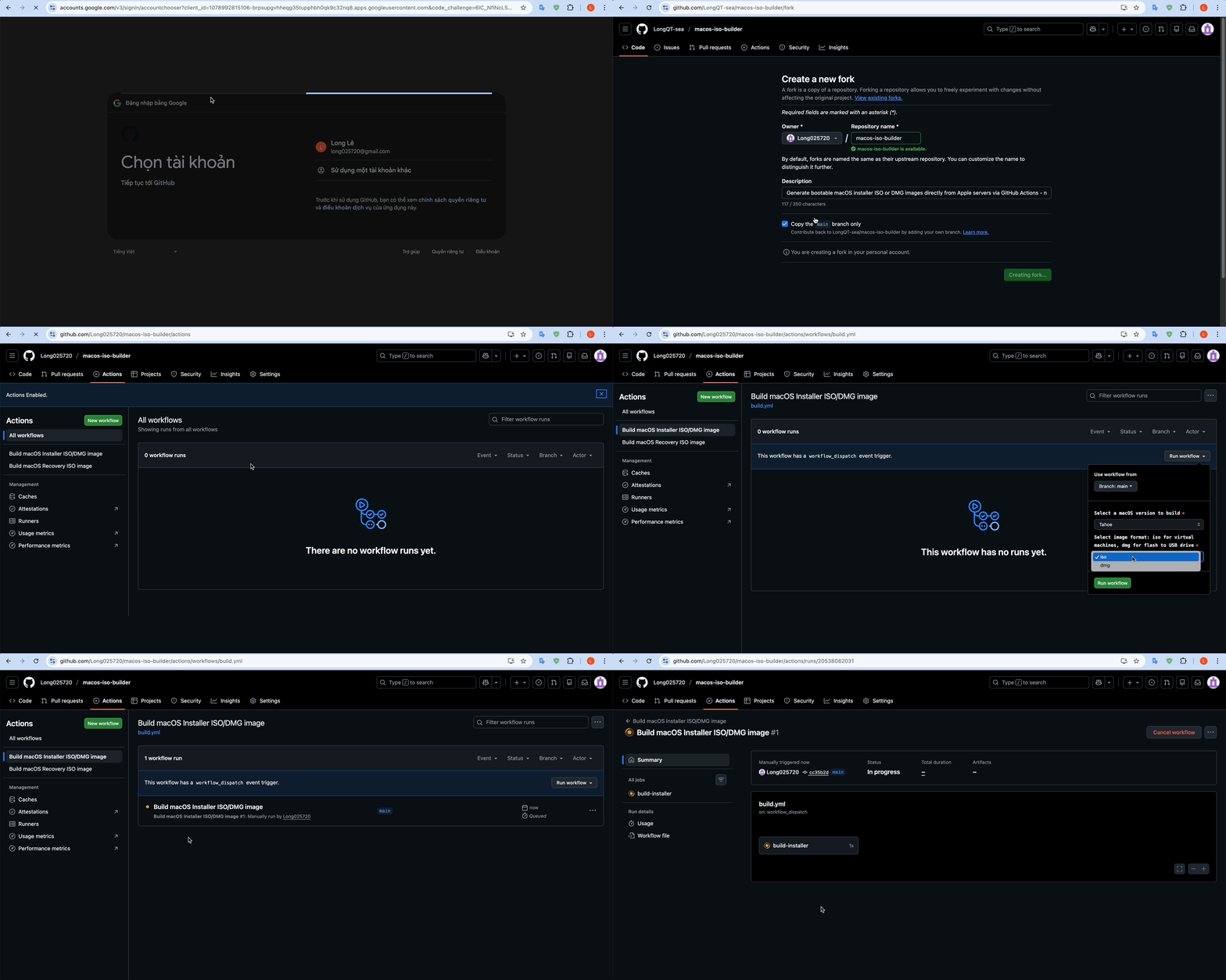
Click here to watch a visual guide (GIF)
-
Star and then Fork this repository (requires a GitHub account).

-
Navigate to the Actions tab in your forked repository.
-
Click the green "I understand my workflows, go ahead and enable them" button.
-
Select a workflow from the left sidebar:
- Recovery ISO (recommended) - Small recovery image, builds in 2-5 minutes. Good for VMs.
- Full Installer - Complete offline installer, 5-18GB, takes 5-60 minutes to build.
-
Click the "Run workflow" button and configure the workflow inputs:
- macOS version – Choose a version (Sequoia, Sonoma, etc.).
- Image format – Choose
isofor virtual machines ordmgfor bootable USB drives.
-
Click the green "Run workflow" button to start the build, then wait for the workflow to complete.
-
Once completed, reload the page and scroll down to the Artifacts section. Click the artifact link to start downloading (e.g.,
macOS_Sequoia_15.7.4.iso). -
Recovery ISO artifacts are zipped — unzip before use.
Already have macOS? Run mkmaciso locally
Quick run using Terminal.app (change tahoe to whatever you want):
curl -s https://raw.githubusercontent.com/LongQT-sea/mkmaciso/main/mkmaciso | bash -s tahoe
Or download the script first, then run with parameters:
curl -O https://raw.githubusercontent.com/LongQT-sea/mkmaciso/main/mkmaciso
chmod +x mkmaciso
./mkmaciso --help
Running ./mkmaciso without arguments gives you an interactive menu.
Tips
For VMs, just attach the ISO as a virtual CD drive. Proxmox users — if you want better performance, look into GPU passthrough. I have another repo (OpenCore-ISO) that might help with installation, and one for Intel iGPU passthrough specifically.
For bootable USB drives, after you flash the DMG there will be leftover space on the drive. You can use that to create a FAT32 partition for your EFI folder if you need one.
If you're using dd on Linux, triple-check your target device. dd doesn't ask for confirmation.
Requirements for mkmaciso
- macOS 10.9 or newer (11+ is better)
- Intel Mac recommended, Apple Silicon works but with some limitations
- 20-40GB of free space while building
- Internet connection
- sudo access
Credits
Apple for macOS and their update servers, Mavericks Forever for documenting the Mavericks recovery protocol, and the InsanelyMac community for their research on downloading macOS directly from Apple's catalog.
Legal stuff
This tool downloads macOS images directly from Apple's official servers. Users are responsible for complying with Apple's Software License Agreement. macOS is a trademark of Apple Inc.
Licensed under GPLv3.